Group Manager
The functionality is available in PRO Edition only
PROGroupManager is a ready-made panel that lets users create, rename, reorder, and delete the board's columns and swimlanes. This guide covers how to mount it, where it can appear, what it changes on the board, and how to save those changes.
The panel edits group configuration only: labels, order, and which groups exist. It never moves or deletes cards. Every edit goes through the regular store actions (add-column, update-column, move-column, delete-column, and their swimlane counterparts). So anything that listens to the action pipeline, such as RestDataProvider or your own api.on handlers, sees the panel's edits the same way it sees edits made from code.
The panel is a separate component. It works with any board you pass to it through the api prop, and you decide when it's visible. For the full prop list, see the GroupManager reference.
Mounting the panel
Render <GroupManager> next to <Kanban> and pass it the board's API. Use a conditional expression to show or hide it:
import { useState } from "react";
import { Kanban, GroupManager } from "@svar-ui/react-kanban";
import "./Board.css";

const columns = [
    { id: "todo", label: "To do" },
    { id: "doing", label: "In progress" },
    { id: "done", label: "Done" },
];
const cards = [
    { id: 1, label: "Draft spec", column: "todo" },
    { id: 2, label: "Build API", column: "doing" },
];

function Board() {
    const [api, setApi] = useState();
    const [open, setOpen] = useState(true);

    return (
        <>
            <button onClick={() => setOpen(!open)}>Manage groups</button>

            <div className="board">
                <Kanban cards={cards} columns={columns} init={setApi} />
                {open && api && (
                    <GroupManager
                        api={api}
                        placement="sidebar"
                        onClose={() => setOpen(false)}
                    />
                )}
            </div>
        </>
    );
}

export default Board;
/* Board.css */
.board {
    position: relative;
    display: flex;
    height: 100%;
}
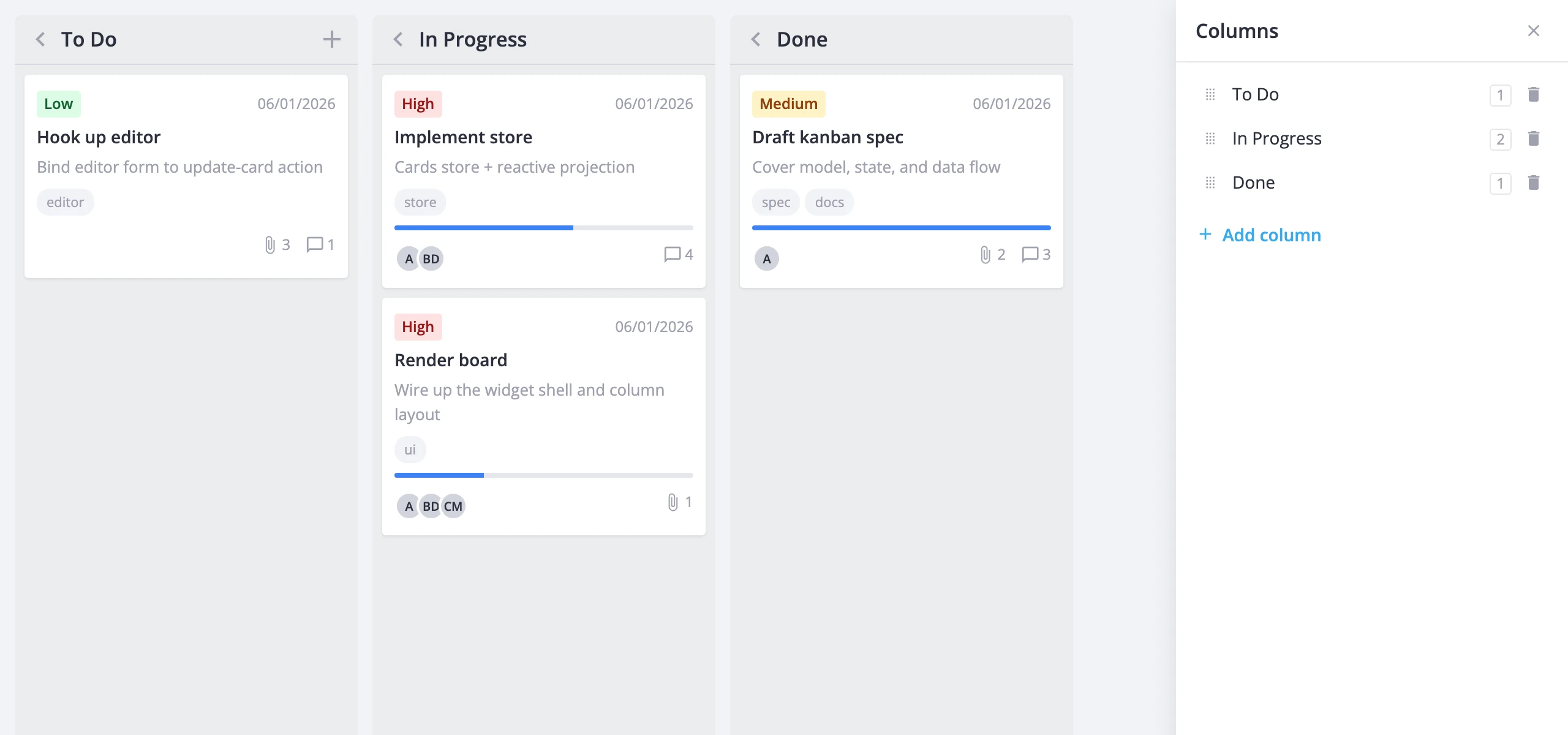
The panel doesn't track its own visibility. The onClose callback runs when the user clicks the close button in the panel header, or cancels the modal or popup. Set your flag to false there. If api is null, the panel renders empty and does nothing, so you can also mount it before the board is ready.
To show the panel without any edit controls, pass readonly. Users then can't add, delete, rename, or reorder groups, but they still see the card counts and the ungrouped-cards notice.
Placement options
The placement prop sets how the panel is shown:
"inline"(default) - a plain block that you place anywhere in your layout."sidebar"- a side panel. Put it inside a container withposition: relative, like the.boardwrapper above. The sidebar positions itself against that container."modal"- a modal dialog with a header and no footer buttons."popup"- a popup attached to the element you pass asparent.
For a popup, pass the anchor element, usually the button that opens the panel:
import { useState, useRef } from "react";
import { Kanban, GroupManager } from "@svar-ui/react-kanban";

const columns = [
    { id: "todo", label: "To do" },
    { id: "done", label: "Done" },
];
const cards = [];

function Board() {
    const [api, setApi] = useState();
    const [open, setOpen] = useState(false);
    const anchor = useRef(null);

    return (
        <>
            <span ref={anchor}>
                <button onClick={() => setOpen(!open)}>Manage groups</button>
            </span>

            <Kanban cards={cards} columns={columns} init={setApi} />
            {open && api && (
                <GroupManager
                    api={api}
                    placement="popup"
                    parent={anchor.current}
                    onClose={() => setOpen(false)}
                />
            )}
        </>
    );
}

export default Board;
Managing swimlanes too
By default the panel lists only columns. Add the swimlanes prop to show tabs that switch between the column list and the swimlane list:
import { useState } from "react";
import { Kanban, GroupManager } from "@svar-ui/react-kanban";

const columns = [
    { id: "todo", label: "To do" },
    { id: "done", label: "Done" },
];
const swimlanes = [
    { id: "product", label: "Product" },
    { id: "platform", label: "Platform" },
];
const cards = [
    { id: 1, label: "Pricing page", column: "todo", swimlane: "product" },
    { id: 2, label: "CI cache", column: "done", swimlane: "platform" },
];

function Board() {
    const [api, setApi] = useState();

    return (
        <div className="board">
            <Kanban
                cards={cards}
                columns={columns}
                swimlanes={swimlanes}
                init={setApi}
            />
            {api && <GroupManager api={api} placement="sidebar" swimlanes />}
        </div>
    );
}

export default Board;
The swimlane tab stays available even when the board has no lanes, so users can create the first one from the panel. See Swimlanes for how lanes work on the board.
Panel labels come from the board's locale. Without one, the panel uses English. See Localization.
Editing columns and swimlanes
Each row in the panel is one column or swimlane. Users can edit rows with the mouse or the keyboard:
- Rename. Click a label, or press
Enteron a focused row, to edit it.Enteror moving focus away saves the new label.Escapecancels. An empty or whitespace-only label also cancels, so a group can't lose its name. - Add. The add button creates a real group right away and focuses its label input. If the user cancels the rename, the group keeps its default label.
- Delete. Deletion is immediate. There's no confirmation step. Focus moves to a remaining row, or to the empty list.
- Reorder. Drag a row by its handle, or press
Alt+ArrowUp/Alt+ArrowDownon a focused row. A drag that ends in the row's own slot does nothing.
Deleting a group removes only its configuration. Cards that pointed to it stay in the data, still carrying the old column or lane value. The next section shows how the panel handles them.
When a user adds a column on a board with dynamic loading enabled, the new column starts with an unknown loading status. It requests its data when it becomes visible, the same way as any other column.
Counts and ungrouped cards
Every row shows how many cards belong to that group. The counts follow the board's active filters, so they match what the user can see. They also include cards in collapsed columns and lanes.
Each axis is counted on its own. When a swimlane is deleted, its cards still count toward their columns. When a column is deleted, its cards still count toward their swimlanes.
Restoring missing groups
If some cards point to a group that no longer exists, the panel shows an "ungrouped cards" notice for that axis. The notice lists each missing ID with a restore button. Restoring recreates the group with that ID and uses String(id) as its label. The group's original metadata isn't restored.
The notice uses the same rules as column inference. Only string and number IDs count. The panel compares IDs by strict identity and lists missing groups in order of first appearance.
Deleting the last swimlane turns lane grouping off, and the swimlane list becomes empty. The notice then lists the lane IDs that the cards still use, so users can recreate each one from the swimlane tab.
Saving changes
The panel dispatches these actions:
| User action | Columns | Swimlanes |
|---|---|---|
| Add | add-column | add-swimlane |
| Rename | update-column | update-swimlane |
| Reorder | move-column | move-swimlane |
| Delete | delete-column | delete-swimlane |
Adding, reordering, and deleting a group resets undo/redo history. Renaming doesn't. These actions don't touch cards, the selected card, or per-column loading state.
Keep explicit columns and swimlanes
If you omit columns (or swimlanes), the board infers groups from card values. On an inferred axis, the board rebuilds the group list on the next card or accessor change, so groups added, renamed, or reordered in the panel are lost. To keep the user's edits, always pass explicit columns and swimlanes arrays when you use GroupManager. The panel never switches inference on or off for you.
Persist to a backend
RestDataProvider already handles the group actions. Attach it with api.setNext() in init, and the panel's edits go to the server:
import { useState, useEffect, useMemo } from "react";
import { Kanban, GroupManager, RestDataProvider } from "@svar-ui/react-kanban";

const url = "https://example.com/api/board";

function Board() {
    const provider = useMemo(() => new RestDataProvider(url), []);
    const [api, setApi] = useState();
    const [state, setState] = useState();

    useEffect(() => {
        fetch(url)
            .then(r => r.json())
            .then(setState);
    }, []);

    if (!state) return null;

    return (
        <div className="board">
            <Kanban
                cards={provider.parseCards(state.cards)}
                columns={state.columns}
                swimlanes={state.swimlanes}
                init={value => {
                    value.setNext(provider);
                    setApi(value);
                }}
            />
            {api && <GroupManager api={api} placement="sidebar" swimlanes />}
        </div>
    );
}

export default Board;
For each axis (columns or swimlanes), the provider calls these endpoints:
| Action | Request |
|---|---|
| Add | POST /:axis with the full config and a before anchor |
| Rename | PUT /:axis/:id with the changed fields (debounced 500 ms) |
| Move | PUT /:axis/:id/move with { before } |
| Delete | DELETE /:axis/:id |
A null anchor means "append". When the backend returns a new ID for an added group, the provider maps it into later queued requests. On the client, the group keeps its local ID, the same way added cards do. See Working with server for the card endpoints and live sync.