Sorting
Sorting reorders cards within each column - by priority, deadline, name, or any criterion you choose - so the most relevant items float to the top.
Sort criterion
The board accepts a sort criterion in one of three forms:
- Declarative object -
{ field, dir }wherefieldis the card property name anddiris"asc"(default) or"desc". The board compares values using standard</>operators, so strings sort alphabetically and numbers sort numerically. - Custom comparator - a function
(a, b) => number, same contract asArray.prototype.sort. Reach for this when you need multi-field logic or non-trivial ordering (e.g., status enums mapped to a custom rank). - Null - clears the sort and restores the original card order.
Sorting is per-column. Cards within each column get reordered, but a sort never moves cards across columns.
// declarative
const sort = { field: "priority", dir: "desc" };

// comparator
const sort = (a, b) => {
	const rank = { High: 3, Medium: 2, Low: 1 };
	return (rank[b.status] || 0) - (rank[a.status] || 0);
};
Initial sort
Pass the sort prop to sort cards on first render.
import { Kanban } from "@svar-ui/react-kanban";

const columns = [
  { id: "backlog", label: "Backlog" },
  { id: "doing", label: "In Progress" },
  { id: "done", label: "Done" },
];
const cards = [
  { id: 1, label: "Design landing page", priority: 3, column: "backlog" },
  { id: 2, label: "Fix login bug", priority: 1, column: "doing" },
  { id: 3, label: "Write tests", priority: 2, column: "backlog" },
];

export default function App() {
  return (
    <Kanban cards={cards} columns={columns} sort={{ field: "priority", dir: "desc" }} />
  );
}
Cards in each column appear ordered from highest to lowest priority. To reverse the order, change dir to "asc".
Runtime sort changes
Dispatch sort-cards through the API to change the criterion at any time. Pass sort: null to clear it and restore the original order.
import { useRef } from "react";
import { Kanban } from "@svar-ui/react-kanban";

const columns = [
  { id: "backlog", label: "Backlog" },
  { id: "doing", label: "In Progress" },
];
const cards = [
  { id: 1, label: "Alpha task", priority: 2, column: "backlog" },
  { id: 2, label: "Beta task", priority: 1, column: "doing" },
];

export default function App() {
  const apiRef = useRef(null);

  const sortByLabel = () => {
    apiRef.current.exec("sort-cards", { sort: { field: "label", dir: "asc" } });
  };

  const clearSort = () => {
    apiRef.current.exec("sort-cards", { sort: null });
  };

  return (
    <>
      <button onClick={sortByLabel}>Sort A-Z</button>
      <button onClick={clearSort}>Clear sort</button>
      <Kanban ref={apiRef} cards={cards} columns={columns} />
    </>
  );
}
Each call replaces the previous criterion - there's no built-in multi-level sort. If you need composite ordering, pass a comparator function that handles tie-breaking across fields yourself.
Built-in sort button
Toolbar ships a ready-made sort menu. Enable it with the sort prop - no extra wiring needed.
import { useState } from "react";
import { Kanban, Toolbar, Editor } from "@svar-ui/react-kanban";

const columns = [
  { id: "backlog", label: "Backlog" },
  { id: "doing", label: "In Progress" },
  { id: "done", label: "Done" },
];
const cards = [
  { id: 1, label: "Design mockups", priority: 3, column: "backlog" },
  { id: 2, label: "API integration", priority: 1, column: "doing" },
  { id: 3, label: "Release notes", priority: 2, column: "done" },
];

export default function App() {
  const [api, setApi] = useState(null);

  return (
    <>
      {api && <Toolbar api={api} sort={true} />}
      <Kanban init={setApi} cards={cards} columns={columns} />
      {api && <Editor api={api} />}
    </>
  );
}
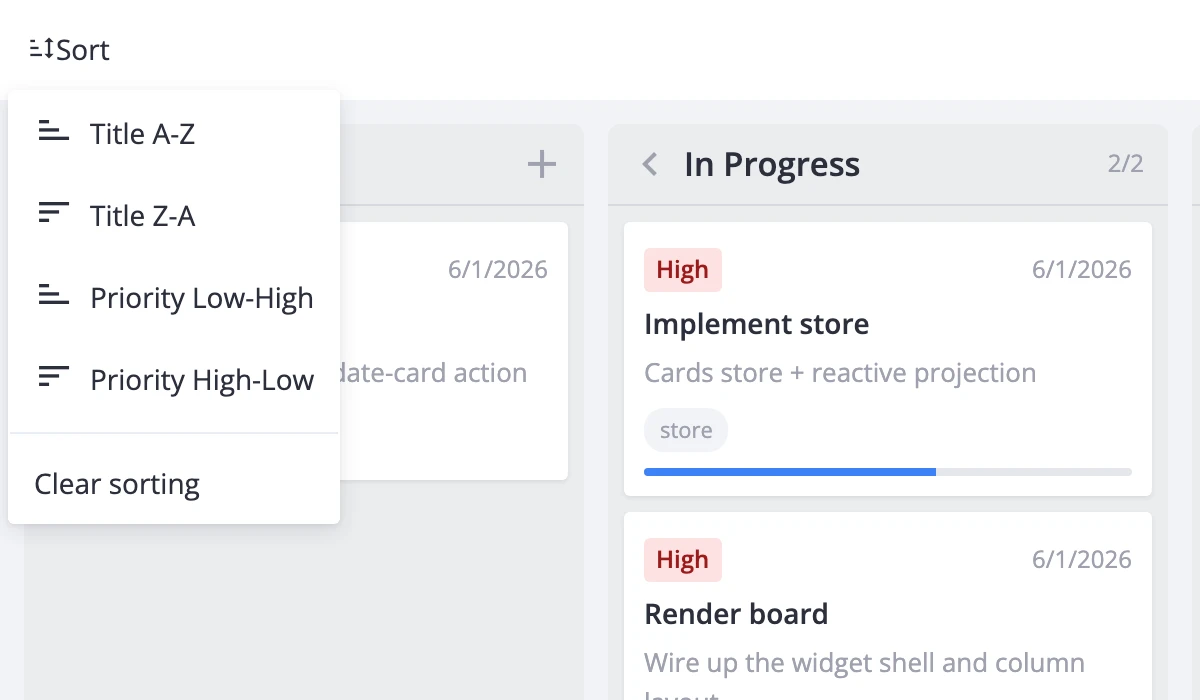
The menu offers four options - label ascending/descending and priority ascending/descending - plus a "Clear" entry that resets to the original order. Each dispatches sort-cards internally.
If you need sort entries beyond label and priority, build a toolbar item array with getToolbarItems, replace or extend the sort section, and pass it to Toolbar via the items prop.