Filtering
This guide covers how to control which cards appear on the board - from a single initial predicate to stacked, independently managed filters driven by external UI controls.
How filters work
Filtering is a view-level operation. The source card array stays intact; filters only control what the board renders.
The store keeps a Map<string, FilterPredicate> in state.filters. Each entry pairs a tag (a string you choose) with a predicate (a function that receives a card and returns true to keep it). When multiple filters are active, they stack with AND - a card must pass every predicate to appear on the board.
The projection pipeline applies filters before sorting. Drag-and-drop operates on the visible set; hidden cards stay in source order and reappear when filters are cleared.
Two things worth noting:
api.getCards()returns the full, unfiltered card array - the persistence snapshot.api.getState().viewDatareflects the filtered, sorted result the board actually renders.
Initial filter
Pass a filters prop to apply filters on first render. The value is a Map whose keys are tags and whose values are predicates:
import { Kanban } from "@svar-ui/react-kanban";

const filters = new Map([
  ["priority", card => card.priority === 3],
  ["mine", card => card.assignee === currentUser],
]);

<Kanban cards={cards} columns={columns} filters={filters} />
Both predicates apply from the start. Only cards that are high-priority and assigned to currentUser will be visible.
Changing the filters prop later replaces the entire filter map in the store. For interactive filtering, prefer dispatching filter-cards actions instead - that way you update one filter at a time without touching the rest of the board state.
Runtime filter changes
Use api.exec("filter-cards", ...) to add, replace, or remove filters at runtime. The tag field identifies which filter slot you're targeting.
Setting a filter
api.exec("filter-cards", {
	tag: "search",
	filter: card => card.label.toLowerCase().includes(term),
});
This creates (or replaces) the filter under the "search" tag. Other active filters are unaffected.
Stacking independent filters
Each tag is independent. Set multiple tags and they all apply:
api.exec("filter-cards", {
	tag: "search",
	filter: card => String(card.label ?? "").includes(term),
});

api.exec("filter-cards", {
	tag: "priority",
	filter: card => card.priority === 3,
});
Clearing "search" later leaves "priority" active.
Removing a single filter
Pass the tag without a filter (or with filter: null):
api.exec("filter-cards", { tag: "search" });
Clearing all filters
Dispatch an empty payload:
api.exec("filter-cards", {});
Integrating SVAR filter widgets
Kanban doesn't ship a built-in filter bar. You can wire any UI to filter-cards, but the @svar-ui/react-filter package provides ready-made controls that produce predicates from user input.
The filter widgets need their own theme wrappers (Willow / WillowDark from @svar-ui/react-filter), separate from the Kanban theme.
Field descriptors
All three filter widgets below accept a fields array that describes which card properties are searchable:
const fields = [
	{ id: "label", label: "Label", type: "text" },
	{ id: "description", label: "Description", type: "text" },
	{ id: "priority", label: "Priority", type: "number" },
	{ id: "column", label: "Column", type: "text" },
];
FilterBar - simple text search
FilterBar renders a compact search input. Wire its onChange to dispatch a filter:
import { Kanban } from "@svar-ui/react-kanban";
import { FilterBar, createFilter } from "@svar-ui/react-filter";
import { useState, useRef } from "react";

const [api, setApi] = useState(null);
const fields = [{ id: "label", label: "Label", type: "text" }];

<FilterBar
  debounce={0}
  fields={fields}
  onChange={({ value }) => {
    api.exec("filter-cards", {
      tag: "search",
      filter: createFilter(value),
    });
  }}
/>
<Kanban cards={cards} columns={columns} init={obj => setApi(obj)} />
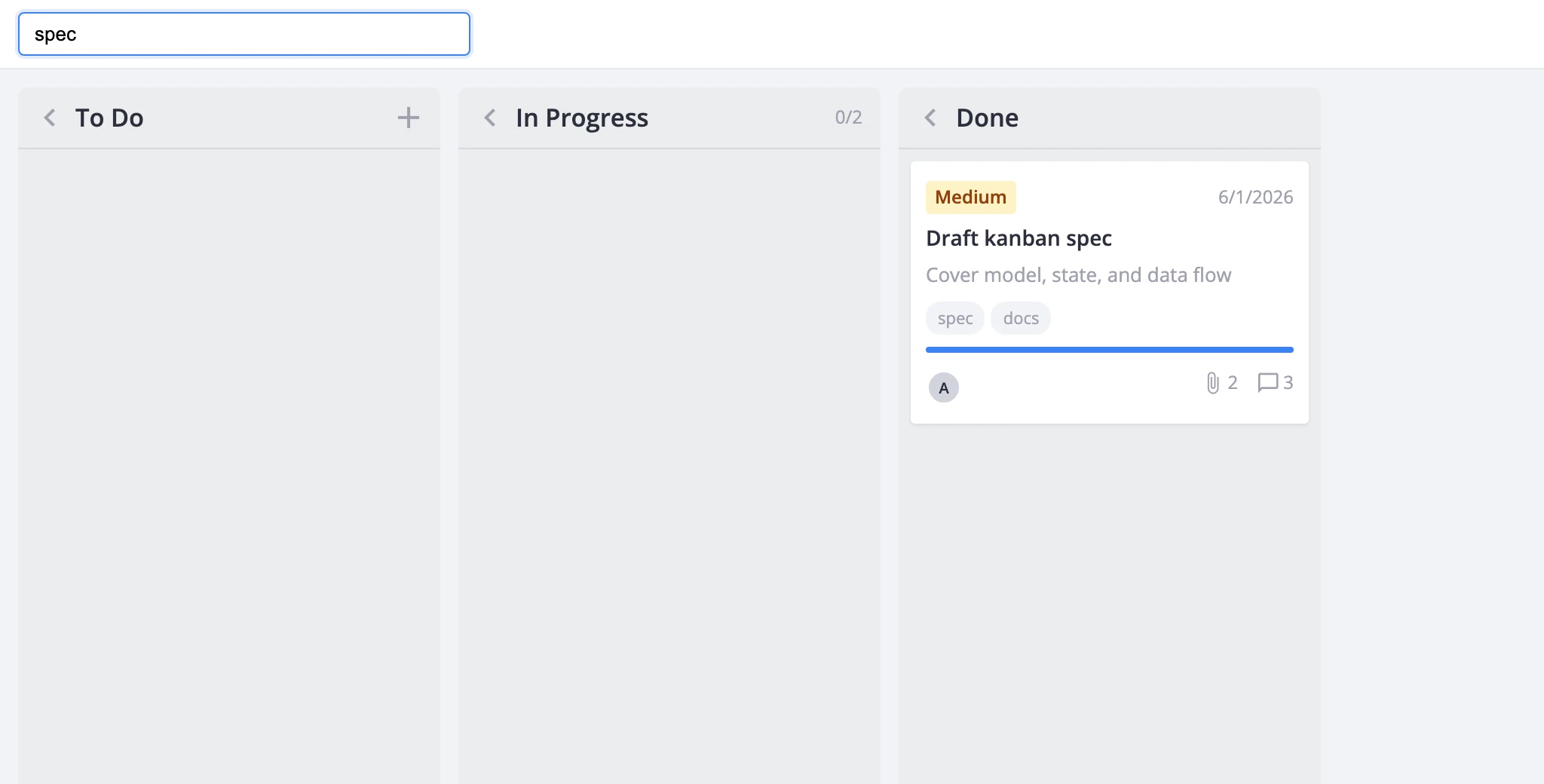
FilterBuilder - structured conditions
FilterBuilder lets users build multi-field filter rules through a UI:
<FilterBuilder
  fields={fields}
  type="line"
  onChange={({ value }) => {
    api.exec("filter-cards", {
      tag: "builder",
      filter: createFilter(value),
    });
  }}
/>
FilterQuery - query string with optional natural language
FilterQuery accepts structured query input. You can optionally send free text to a backend service that returns a filter JSON object:
<FilterQuery
  value={textValue}
  fields={fields}
  onChange={async ({ value, text, error, startProgress, endProgress }) => {
    if (text) {
      startProgress();
      try {
        value = await textToFilter(text, fields);
      } finally {
        endProgress();
      }
    }

    if (!error) {
      api.exec("filter-cards", {
        tag: "query",
        filter: createFilter(value, {}, fields),
      });
    }
  }}
/>
The natural-language endpoint is yours to build. Kanban doesn't parse free text - it only receives the final predicate through filter-cards.