Context Menu
This guide covers how to attach a right-click menu to events in the calendar - the default edit/delete pair, custom entries, and the gates that hide the menu or its items based on event state.
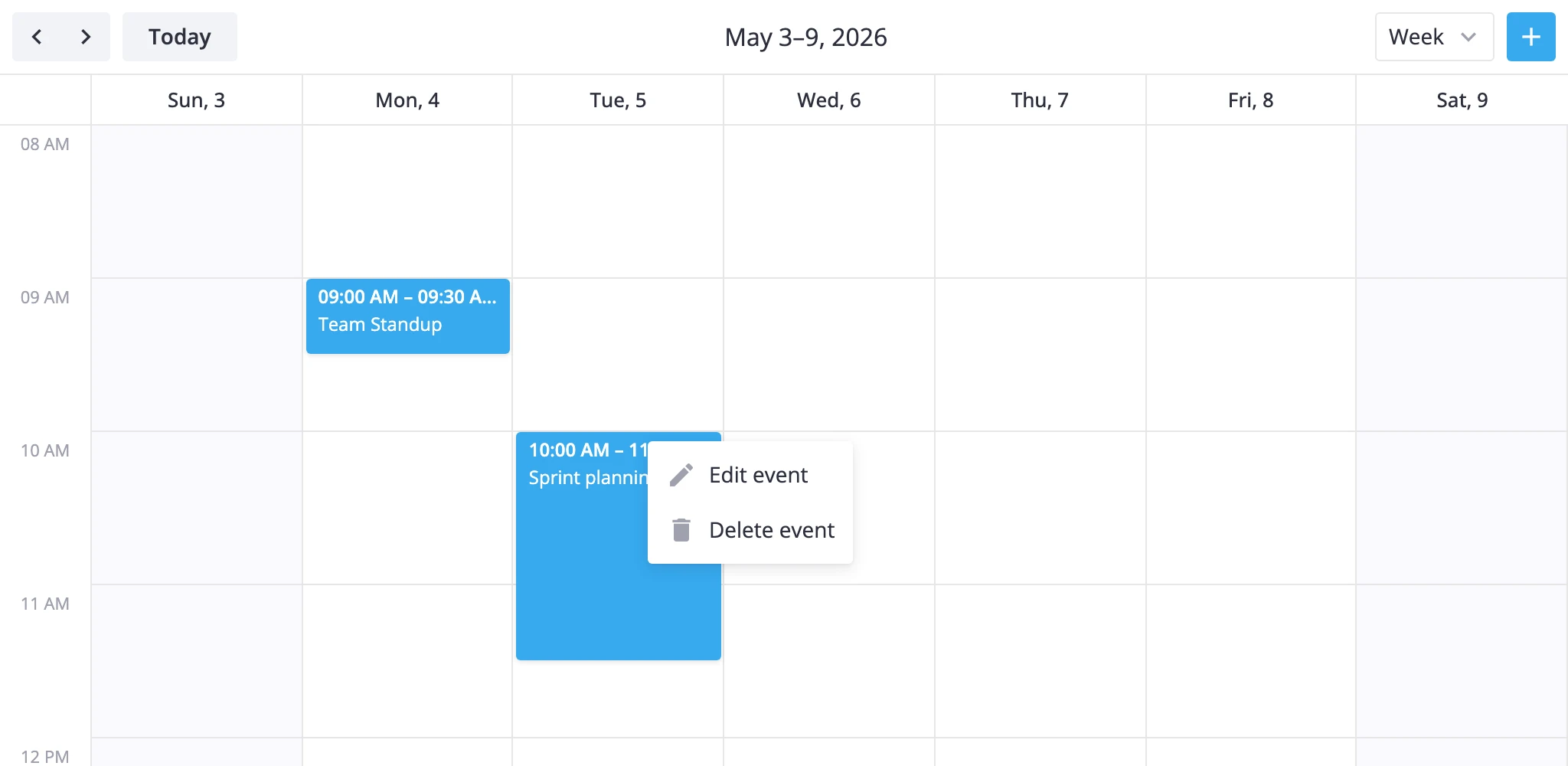
How the context menu works
ContextMenu is a wrapper. You drop it around <Calendar> and it intercepts right-clicks on rendered events, resolves which event was clicked, and opens a menu pinned to the cursor or the target.
A few rules drive how it behaves:
- Default options come from
getMenuOptions(). If you pass an emptyoptionsarray, the wrapper falls back to the built-inedit-eventanddelete-evententries. - Built-in ids run automatically. Clicking
edit-eventdispatchesselect-eventso the editor opens; clickingdelete-eventdispatchesdelete-event. Both go throughapi.exec(...). - Custom ids do not auto-dispatch. They surface only through
onClick. If you want them to trigger a calendar action, callapi.exec(...)yourself in the handler. - Two gates control visibility.
resolverdecides whether the menu opens for a given event;filterdecides which items appear inside it.
The wrapper also exposes a show(ev, obj?) method, so you can open the menu from a custom button (for example a three-dot icon inside eventContent) instead of waiting for a real right-click.
Wrapping the calendar
Put ContextMenu around <Calendar> and pass the same api you bind from the calendar. Without api the menu can't resolve the clicked event.
import { useRef } from "react";
import { Calendar, ContextMenu, Editor } from "@svar-ui/react-calendar";

function App() {
    const api = useRef(null);

    return (
        <>
            <ContextMenu api={api.current}>
                <Calendar ref={api} events={events} date={date} />
            </ContextMenu>
            {api.current && <Editor api={api.current} />}
        </>
    );
}
Mount the Editor next to it if you want the built-in edit-event entry to actually open a form - that action only selects the event in store state.
Default menu items
Skip options (or pass []) to get the built-in pair:
| ID | Label | Effect |
|---|---|---|
edit-event | Edit event | Dispatches select-event with the event id |
delete-event | Delete event | Dispatches delete-event with the event id |
Labels run through the eventCalendar locale group, so they translate when you wrap your app in <Locale>. If no locale context is mounted, the wrapper falls back to its English bundle.
Custom items
To add your own entries, spread getMenuOptions() and append. Then handle the new ids in onClick.
import { useRef } from "react";
import {
    Calendar,
    ContextMenu,
    Editor,
    getMenuOptions,
} from "@svar-ui/react-calendar";

function App() {
    const api = useRef(null);

    const options = [
        ...getMenuOptions(),
        { id: "my-action", text: "My action", icon: "wxi-empty" },
    ];

    const onClick = ({ action, context }) => {
        if (action.id === "my-action") {
            console.log("Clicked", action.id, context);
        }
    };

    return (
        <>
            <ContextMenu api={api.current} options={options} onClick={onClick}>
                <Calendar ref={api} events={events} date={date} />
            </ContextMenu>
            {api.current && <Editor api={api.current} />}
        </>
    );
}
onClick runs after the built-in handler, so even if the user clicks edit-event you'll still see it. Use action.id to branch. context is the resolved CalendarEvent.
If you want the wrapper to forward custom ids back into the calendar action bus, call api.exec("action", { id: action.id }) from inside the handler - onAction on the calendar will then receive it.
Conditional entries
Two callbacks let you vary the menu by event state.
resolver runs once per right-click. It receives the resolved event and the original mouse event. Return a falsy value and the menu doesn't open.
filter runs per item, for the resolved event. Return false and that item is hidden.
import { useRef } from "react";
import { Calendar, ContextMenu } from "@svar-ui/react-calendar";

function App() {
    const api = useRef(null);

    const resolver = (event) => {
        // hide the menu entirely for read-only events
        return !event.readOnly;
    };

    const filter = (item, event) => {
        // keep "Delete" away from locked events
        if (event.locked && item.id === "delete-event") return false;
        return true;
    };

    return (
        <ContextMenu api={api.current} resolver={resolver} filter={filter}>
            <Calendar ref={api} events={events} date={date} />
        </ContextMenu>
    );
}
Use resolver for whole-event policies (read-only, foreign calendar, archived). Use filter to trim individual items based on per-event state (locked, recurring exception, role-based).
For the full prop list and the show() method, see the ContextMenu reference page.