Recurring Events
This guide covers how to model repeating events in the calendar - daily standups, weekly syncs, monthly planning - and how the store turns a single master record into the concrete instances users see on the grid.
The functionality is available in PRO Edition only
PRO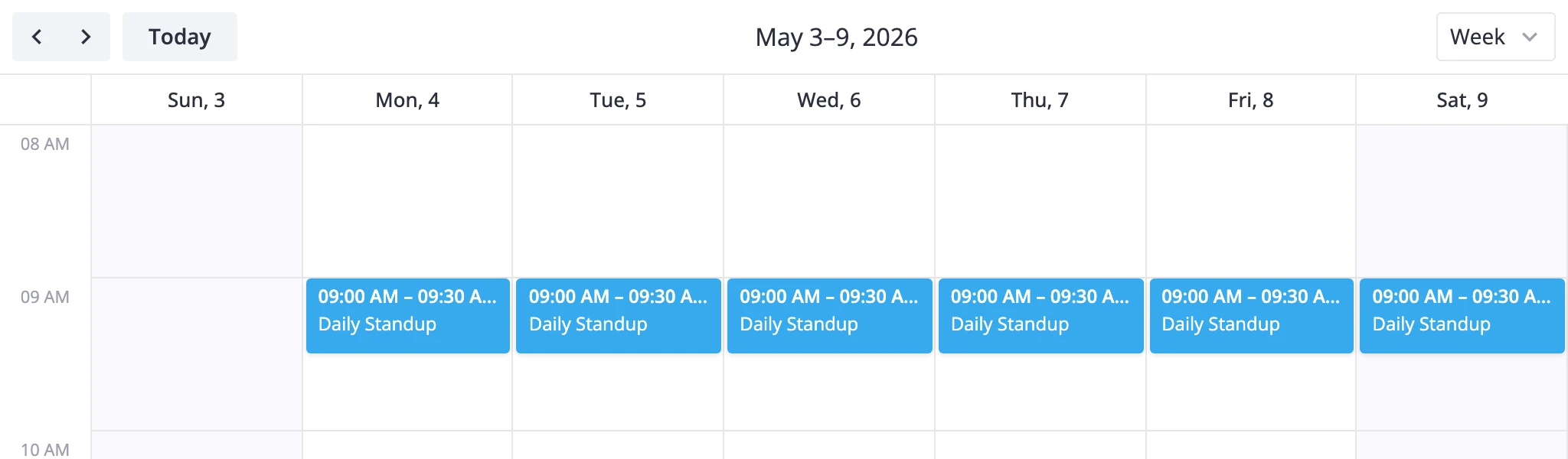
How recurrence works
Recurrence is opt-in. Set the recurring prop on <Calendar> to true and the store starts treating events with an rrule field as recurring masters. With recurring={false} (the default), rrule is just another custom field - events stay one-off records.
A recurring event has two parts in the store:
- A master event with
start,end, and an iCalrrulestring. The master describes the pattern. - Instances generated on the fly when a view queries a date range. Instances are virtual - they live only in
getEvents(start, end)results, never in the stored array.
Two more record types come into play once users start editing:
- Exception events - separate stored records that override one occurrence (e.g. a standup moved from 9am to 10am on one day). They carry
masterEventIdandoriginalDateand have norruleof their own. - Exdates - an array of dates on the master marking deleted occurrences, so the expansion skips them.
When the calendar renders a range, the store filters candidates by overlap, then for each master it generates occurrence dates from the RRULE, swaps in any matching exception events, drops any dates listed in exdates, and emits the resulting instances.
The RRULE string
The store ships with a lightweight RRULE engine that supports the most common subset of RFC 5545:
FREQ-DAILY,WEEKLY,MONTHLY,YEARLYINTERVAL- every N periodsBYDAY-MO,TU,WE,TH,FR,SA,SU(with ordinal forms like2TUor-1FRfor monthly rules)BYMONTHDAY,BYMONTH,BYSETPOSCOUNTorUNTILto terminate; omit both for infinite recurrence
The first occurrence anchors the pattern - it comes from the master's start. Each generated instance keeps the same time-of-day and lasts the same duration (computed from the original start/end).
The end field is special on masters
For non-recurring events, end is the event's end time. For a master, the store rewrites end to be the range envelope end - the last instant any instance can fall on. This lets the existing overlap filter pick up a master whenever any of its instances might land in the queried range, without changing the filter code.
The store computes the envelope automatically when you call addEvent with a recurring record:
UNTIL=...- envelope is the UNTIL date plus the instance durationCOUNT=N- envelope is the Nth occurrence start plus the instance duration- Neither - envelope is a far-future sentinel (
9999-12-31T23:59:59Z)
An update-event that changes a master's start, end, or rrule redoes the same math - the recurring store recomputes duration and the envelope before storing. Adding an rrule to a one-off event normalizes it the same way.
Editing scope: series, single, following
When a user edits an instance, they're picking one of three scopes, and each maps to a different update-event payload:
- Whole series - patch the master directly.
update-eventwith no occurrence context:rawIdis the master's canonical id, nomode. - This occurrence only -
mode: "single"with the occurrence'srawId. The store appends the original date toexdatesand creates a new exception event for the modified version. - This and following -
mode: "following"with the occurrence'srawId. The store either patches the master in place (if you picked the very first occurrence) or splits the series: it caps the existing master withUNTILone period before the split point and creates a new master starting at the new date.
The occurrence a user acted on rides along as rawId - the exact rendered instance id, like 42###2026-03-09. The action layer decodes the occurrence date out of rawId, so you dispatch mode and rawId rather than a separate originalDate. Two entry points default differently: a bare drag, or an occurrence-level dispatch with no mode, defaults to single, while the built-in editor defaults to series.
"following" isn't reachable through the standard UI yet - the editor and drag paths only produce series and single edits. Dispatch it yourself with api.exec("update-event", { mode: "following", ... }) if you need it.
Enabling recurrence
Turn on the recurring prop and pass events with rrule set:
import { Calendar } from "@svar-ui/react-calendar";

const events = [
  {
    id: 1,
    text: "Daily Standup",
    start: new Date("2026-03-02T09:00"),
    end: new Date("2026-03-02T09:30"),
    rrule: "FREQ=DAILY;BYDAY=MO,TU,WE,TH,FR",
  },
  {
    id: 2,
    text: "Weekly Review",
    start: new Date("2026-03-04T14:00"),
    end: new Date("2026-03-04T15:30"),
    rrule: "FREQ=WEEKLY;BYDAY=WE",
  },
];

<Calendar events={events} recurring={true} view="week" date={new Date("2026-03-02")} />
With recurring={true}, the store replaces the plain EventsStore with RecurringEventsStore. The two events above produce a daily standup Mon-Fri and a weekly review every Wednesday. Without the prop, both events render once on their start date and rrule is ignored.
Editing with the built-in editor
Recurring events are fully editable through the shipped Editor. With recurring={true}, drop it in next to the calendar and users get a recurrence UI - no custom dialog needed:
import { useRef, useState, useEffect } from "react";
import { Calendar, Editor } from "@svar-ui/react-calendar";

function App() {
  const apiRef = useRef(null);
  const [ready, setReady] = useState(false);

  useEffect(() => {
    if (apiRef.current) setReady(true);
  }, []);

  return (
    <>
      <Calendar
        ref={apiRef}
        events={events}
        recurring={true}
        view="week"
        date={new Date("2026-03-02")}
      />
      {ready && <Editor api={apiRef.current} />}
    </>
  );
}
The editor swaps its schedule field by scope. Series and following edits use the composite event-recurrence form, which exposes the recurrence builder; a single-occurrence edit falls back to the plain event-dates form (start/end/all-day only), since one instance has no pattern to change.
The recurrence builder reads and writes this subset of RRULE:
- Never - clears the rule and turns the master back into a one-off event.
- Daily, weekly, monthly, yearly presets, plus every workday (
FREQ=WEEKLY;BYDAY=MO,TU,WE,TH,FR). - Custom interval - "every N" days/weeks/months/years,
INTERVALemitted when N is above 1. - Weekly by day - pick weekdays via
BYDAY; an empty pick falls back to the start weekday. - Monthly / yearly by day - a fixed day of the month (
BYMONTHDAY; yearly also emitsBYMONTH), or an nth weekday ("second Tuesday", "last Friday") viaBYDAY+BYSETPOS. - End - after a count (
COUNT) or on a date (UNTIL); leave both off for infinite recurrence.
Intervals and counts are capped at 1-999. Any rule the builder can't express opens as a custom entry. See Editing scope for how each scope maps to update-event.
Common RRULE patterns
Examples for the rrule field. The first-occurrence date on the master is what anchors the pattern.
Every weekday:                 FREQ=WEEKLY;BYDAY=MO,TU,WE,TH,FR
Every other Monday:            FREQ=WEEKLY;INTERVAL=2;BYDAY=MO
Monthly on the 15th:           FREQ=MONTHLY;BYMONTHDAY=15
Last Friday of each month:     FREQ=MONTHLY;BYDAY=FR;BYSETPOS=-1
Yearly on March 1, 10 times:   FREQ=YEARLY;BYMONTH=3;BYMONTHDAY=1;COUNT=10
Daily for 30 days:             FREQ=DAILY;COUNT=30
Tue & Thu until year end:      FREQ=WEEKLY;BYDAY=TU,TH;UNTIL=20261231T000000Z
For UNTIL, both YYYYMMDD and YYYYMMDDTHHmmssZ formats work. A date-only value names a day and the whole of that day counts; a value with a Z is an exact instant.
Skipping a single occurrence
To drop one instance without creating a replacement, append the occurrence date to the master's exdates:
const master = api.getEvent(masterId);
api.exec("update-event", {
	id: masterId,
	event: {
		exdates: [...(master.exdates || []), new Date("2026-02-16T09:00")],
	},
});
The expansion compares exdates with strict Date.getTime() equality, so the date has to match the occurrence start exactly (same time-of-day as the master).
Modifying a single occurrence
To move or rename one instance, exclude the original and add a separate exception event with masterEventId and originalDate:
const master = api.getEvent(masterId);
const originalDate = new Date("2026-03-16T09:00");

api.exec("update-event", {
	id: masterId,
	event: {
		exdates: [...(master.exdates || []), originalDate],
	},
});

api.exec("add-event", {
	event: {
		masterEventId: masterId,
		originalDate,
		start: new Date("2026-03-16T10:00"),
		end: new Date("2026-03-16T11:00"),
		text: "Standup (late start)",
		recurring: true,
	},
});
Exception events live in the same events array as everything else. During expansion, the store looks across the whole store for a matching masterEventId + originalDate pair and swaps in the exception in place of the generated instance. The exception's start/end can fall on a different day than the original - the date match is on originalDate, not on where the exception lands.
Editing the whole series
Whole-series edits go straight to the master:
api.exec("update-event", {
	id: masterId,
	event: { text: "Team Standup" },
});
If your update changes start, end, or rrule, the recurring store recomputes duration and the envelope end for you before storing the master.
Splitting the series ("this and following")
"following" isn't wired into the editor yet, so dispatch it yourself. Pass mode: "following" and a rawId carrying the split occurrence in <masterId>###YYYY-MM-DD form:
api.exec("update-event", {
	id: masterId,
	rawId: `${masterId}###2026-03-16`,
	mode: "following",
	event: {
		start: new Date("2026-03-16T10:00"),
		end: new Date("2026-03-16T11:00"),
	},
});
If the split occurrence is the first one, the store updates the master in place and recomputes the envelope. Otherwise it caps the existing master with UNTIL one period before the split and adds a fresh master starting at event.start with the same RRULE pattern. Exception events on or after the split date are removed and not migrated - and unlike the series delete, that removal doesn't emit delete-event actions, so a synced backend keeps those exception records.
Deleting one occurrence
There's no dedicated single-occurrence delete action - handle it as an exdate update plus an exception cleanup:
const master = api.getEvent(masterId);
const occurrenceDate = new Date("2026-03-11T09:00");

api.exec("update-event", {
	id: masterId,
	event: {
		exdates: [...(master.exdates || []), occurrenceDate],
	},
});

// If an exception event exists for this date, remove it explicitly
const exception = api
	.getEvents()
	.find(
		e =>
			e.masterEventId === masterId &&
			e.originalDate?.getTime() === occurrenceDate.getTime()
	);
if (exception) {
	api.exec("delete-event", { id: exception.id });
}
Deleting the whole series
Deleting a master cleans up its exceptions for you. Dispatch delete-event for the master and the store cascades - it removes the master first, then emits one delete-event per linked exception carrying cascade: true:
api.exec("delete-event", { id: masterId });
// providers observe: delete-event { id: masterId },
// then delete-event { id: exceptionId, cascade: true } per exception
The master-first order lets a backend with real foreign-key cascades ignore the flagged child deletes. Under PRO undo history the cascade: true actions are skipped, so a single undo restores the master together with its exceptions.
Clearing a master's rrule runs the same cascade: it converts the event to a one-off and drops the now-orphaned exceptions. Changing rrule to a different rule deliberately does not cascade - existing exdates and exceptions are kept, since they may still line up with the new pattern.
Reading instances
api.getEvents(start, end) returns expanded instances within the bounded range. Each generated instance has an ID like "42###2026-03-09" (master id + ISO date, built by encodeId()) and includes masterEventId plus a recurring: true flag.
const instances = api.getEvents(
	new Date("2026-03-09T00:00"),
	new Date("2026-03-16T00:00")
);
getEvents() with no arguments returns the raw stored data - masters with their rrule and exdates intact, exception events, and normal events. Use the no-args form for export or serialization, not for rendering. Looking up an instance by its generated ID with getEvent("42###2026-03-09") returns undefined - instance IDs are ephemeral. Query a date range and find by ID in the result instead.