Quick start
Get a Calendar on the page in a couple of minutes - install the package, render the widget with your events, and bolt on the editor when you're ready to let users change things.
Install the package
The package ships as @svar-ui/react-calendar. Pick whichever package manager you already use:
npm install @svar-ui/react-calendar
yarn add @svar-ui/react-calendar
bun add @svar-ui/react-calendar
It's built for React, so you'll need a React project.
Import and render
Import Calendar and pass it two things: an events array and a date that decides which day, week, or month is in view on first paint.
import { Calendar, Willow } from "@svar-ui/react-calendar";

const date = new Date(2026, 4, 5);
const events = [
    {
        id: 1,
        start: new Date(2026, 4, 5, 9, 0),
        end: new Date(2026, 4, 5, 10, 0),
        text: "Standup",
    },
];

function App() {
    return (
        <Willow>
            <Calendar events={events} date={date} />
        </Willow>
    );
}

export default App;
The Willow wrapper isn't optional - it injects the CSS variables the calendar styles itself with. Skip it and the widget renders unstyled and effectively broken. Mount it once near your app root; one wrapper covers the calendar, editor, and panel. Use WillowDark instead for dark mode.
Each event needs id, start, and end. Anything else - text, color, your own domain fields - is passed through to the renderers and event handlers untouched. Dates must be real Date instances; ISO strings won't render.
Out of the box you get the day, week, and month views with a toolbar on top. Switching views and stepping through dates already works - no extra wiring.
Add the editor
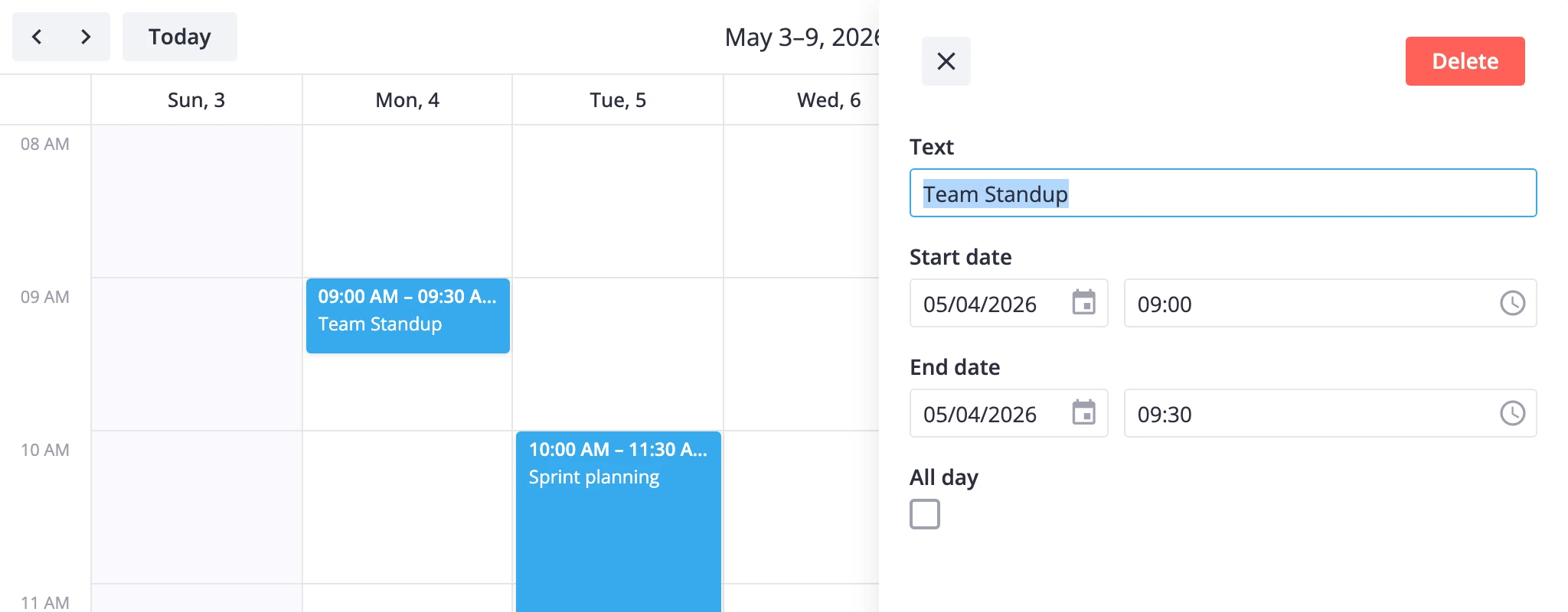
A bare Calendar already supports drag-to-create, move, and resize, but clicking an event has no edit UI to open. To let users edit titles and other fields, grab the instance API with a useRef and mount the Editor next to the calendar.
import { useRef } from "react";
import { Calendar, Editor, Willow } from "@svar-ui/react-calendar";

const date = new Date(2026, 4, 5);
const events = [
    {
        id: 1,
        start: new Date(2026, 4, 5, 9, 0),
        end: new Date(2026, 4, 5, 10, 0),
        text: "Standup",
    },
];

function App() {
    const api = useRef(null);

    return (
        <Willow>
            <Calendar ref={api} events={events} date={date} />
            {api.current && <Editor api={api.current} />}
        </Willow>
    );
}

export default App;
The api.current && guard matters: the ref only resolves after the calendar mounts, so the editor needs to wait one render before it has an api to talk to. Once mounted, it reads the selected event from the calendar's reactive state - clicking an event opens it for editing automatically, and field changes auto-save on blur via the update-event action.
That's the full minimum: a rendered calendar plus a working editor. From here you can pick whichever direction matches what you're building.
Where to go next
- Free vs PRO - what the open-source build covers and what PRO adds (agenda, year, resources, timeline, recurring events).
- Views - day, week, month, year, agenda, timeline, and resources views, plus custom views of your own.
- Core features - editing, the toolbar, time-grid scales, theming with
Willow/WillowDark, per-cell / per-event styling, and localization. - Advanced features - recurring events, filtering, undo/redo, time zones, and loading or saving data.
- API reference - every prop, action, method, and helper exported by the package.