Swimlanes
The functionality is available in PRO Edition only
Swimlanes split the board into horizontal rows, for example one row per team or per customer. Each card then belongs to a column and to a lane. This guide covers how to enable lanes, move cards between them, change them at runtime, and style them.
A board with swimlanes has two grouping axes. Columns are still the stages, and lanes stack vertically across all columns. Every lane has one cell per column. A card shows up in the cell where its column and its lane meet. The store reads lane membership through swimlaneAccessor, the same way it reads column membership through columnAccessor.
Lanes are only a projection. Filtering and sorting work the same as on an ordinary board, and card order stays per column. A lane only filters which cards of that column it shows. In the MIT edition, the swimlane props are accepted but do nothing, and the board renders without lanes.
Enabling swimlanes
Pass the lane definitions to the swimlanes prop. Each entry is a SwimlaneConfig:
id- lane ID (string | number;1and"1"are different lanes)label- text in the lane headercollapsed- initial collapsed statecss- class name added to the lane sectionmetadata- free-form data for your own use
Lanes render in array order. A lane stays visible even when it has no cards.
By default, each card keeps its lane ID in a swimlane field. If your data uses another field, set swimlaneAccessor to its name:
<script setup>
import { Kanban } from "@svar-ui/vue-kanban";

const columns = [
  { id: "todo", label: "To do" },
  { id: "doing", label: "In progress" },
  { id: "done", label: "Done" },
];
const swimlanes = [
  { id: "product", label: "Product" },
  { id: "platform", label: "Platform", collapsed: true },
];
const cards = [
  { id: 1, label: "Plan onboarding", column: "todo", team: "product" },
  { id: 2, label: "Build search", column: "doing", team: "platform" },
];
</script>

<template>
  <Kanban
    :cards="cards"
    :columns="columns"
    :swimlanes="swimlanes"
    swimlaneAccessor="team"
  />
</template>
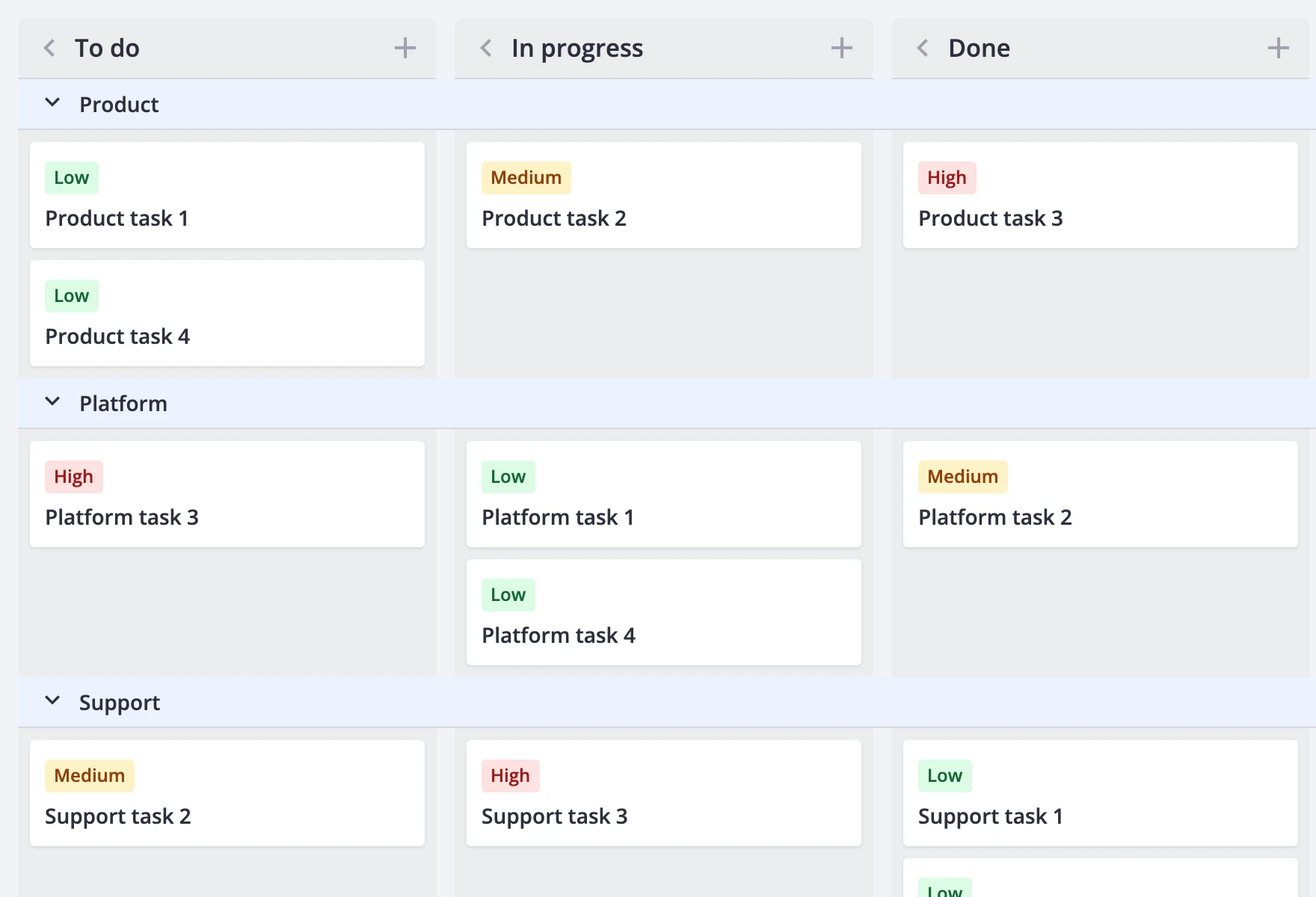
swimlaneAccessor also accepts a { get, set } pair. Use it when membership is derived or needs a fallback. The set function must return a new card object instead of changing the existing one. In this example, cards without a team go to an "Unassigned" lane, and a drop into another lane writes the team back:
<script setup>
import { Kanban } from "@svar-ui/vue-kanban";

const columns = [
  { id: "todo", label: "To do" },
  { id: "doing", label: "In progress" },
  { id: "done", label: "Done" },
];
const swimlanes = [
  { id: "product", label: "Product" },
  { id: "platform", label: "Platform" },
  { id: "unassigned", label: "Unassigned" },
];
const cards = [
  { id: 1, label: "Plan onboarding", column: "todo", team: "product" },
  { id: 2, label: "Capture feedback", column: "todo" },
];

const swimlaneAccessor = {
  get: card => card.team ?? "unassigned",
  set: (card, team) => ({ ...card, team }),
};
</script>

<template>
  <Kanban
    :cards="cards"
    :columns="columns"
    :swimlanes="swimlanes"
    :swimlaneAccessor="swimlaneAccessor"
  />
</template>
To turn lanes off, pass an empty array. A new swimlanes value reloads the board from the cards prop. To keep the edits made so far, copy them back with getCards() before you switch:
<script setup>
import { ref, shallowRef } from "vue";
import { Kanban } from "@svar-ui/vue-kanban";

const columns = [
  { id: "todo", label: "To do" },
  { id: "done", label: "Done" },
];
const lanes = [
  { id: "product", label: "Product" },
  { id: "platform", label: "Platform" },
];

const api = ref(null);
const enabled = ref(true);
const cards = shallowRef([
  { id: 1, label: "Plan onboarding", column: "todo", swimlane: "product" },
  { id: 2, label: "Build search", column: "done", swimlane: "platform" },
]);

function toggle() {
  if (api.value) cards.value = api.value.getCards();
  enabled.value = !enabled.value;
}
</script>

<template>
  <button :onclick="toggle">Toggle swimlanes</button>
  <Kanban
    ref="api"
    :cards="cards"
    :columns="columns"
    :swimlanes="enabled ? lanes : []"
  />
</template>
Pass [], not undefined. If you omit swimlanes, the board infers the lanes from the card data, as the next section shows.
Lanes from data
If you omit the swimlanes prop, the board builds the lanes from the accessor values on the cards. Lanes appear in the order the board first finds each value, and each label is String(id). The same rule applies to columns: omit columns and set columnAccessor, and both axes come from the data:
<script setup>
import { Kanban } from "@svar-ui/vue-kanban";

const cards = [
  { id: 1, label: "Plan onboarding", status: "To do", team: "Product" },
  { id: 2, label: "Build search", status: "In progress", team: "Platform" },
  { id: 3, label: "Review navigation", status: "In progress", team: "Product" },
  { id: 4, label: "Update dependencies", status: "Done", team: "Platform" },
];
</script>

<template>
  <Kanban :cards="cards" columnAccessor="status" swimlaneAccessor="team" />
</template>
Inferred lanes are rebuilt whenever the cards or the accessor change, including edits made on the board. Filtering and sorting don't rebuild them. If no card has a lane value, the board stays an ordinary board without lanes. (Rebuilding discards runtime changes such as renamed or collapsed lanes; pass explicit swimlanes to preserve them)
A card whose lane value is missing or doesn't match a known lane isn't shown on the board. The card isn't lost. It's still part of getCards(), so you save it with the rest of the data. To keep such cards visible, declare an "Unassigned" lane and map them to it with a { get, set } accessor, as in the previous section.
Moving cards between lanes
Users drag cards between cells. A drop into another cell updates both memberships in one action. Collapsed lanes and collapsed columns don't accept drops. When the pointer is near the edge of the board, the board scrolls.
From code, the move-card action takes an optional swimlane field:
api.exec("move-card", {
	id: 2,
	column: "done",
	swimlane: "platform",
	before: null,
});
If you omit swimlane, the card stays in its current lane. The before card must be in the destination column. Card order is per column, so the before card can be in any lane. If the move isn't valid, the store cancels the move before any data changes. A move that changes both column and lane is one entry in the undo history.
Double-click an empty spot in a cell to add a card to it. The new card gets both the column and the lane of that cell. Other ways to add a card, such as the column's add button, put the new card in the first declared lane when it has no valid lane.
Duplicated cards keep their lane. If you edit the lane field of a card, the card moves to the new lane.
If you use RestDataProvider, it sends the move-card payload as is, including swimlane. Your backend must save that field.
Changing lanes at runtime
Four actions change the lane configuration after the board mounts:
update-swimlane- patch a lane, for example rename or collapse itadd-swimlane- insert a lane, optionallybeforeanother lanemove-swimlane- reorder a lanedelete-swimlane- remove a lane
api.exec("update-swimlane", {
	id: "platform",
	swimlane: { label: "Infrastructure" },
});
api.exec("add-swimlane", {
	swimlane: { id: "support", label: "Support" },
	before: "platform",
});
api.exec("move-swimlane", { id: "support", before: null });
api.exec("delete-swimlane", { id: "support" });
These actions change the configuration only. They never touch the cards. When you delete a lane, its cards stay in the data but no longer show on the board until you move them to another lane. add-swimlane, move-swimlane, and delete-swimlane reset the undo history. update-swimlane doesn't.
Each action has a matching event prop on <Kanban>: onupdateswimlane, onaddswimlane, onmoveswimlane, and ondeleteswimlane. Use them to save lane changes on the server:
<template>
  <Kanban
    :cards="cards"
    :columns="columns"
    :swimlanes="swimlanes"
    :onaddswimlane="({ id, swimlane }) => saveLane(id, swimlane)"
    :onupdateswimlane="({ id, swimlane }) => patchLane(id, swimlane)"
    :ondeleteswimlane="({ id }) => removeLane(id)"
  />
</template>
saveLane, patchLane, and removeLane are your own functions. To let users manage lanes from the UI, add GroupManager. It creates, renames, reorders, and deletes columns and swimlanes with the same actions.
Collapse and scrolling
Each lane header has a collapse toggle. Clicking it dispatches update-swimlane with the new collapsed value. Collapse also works in readonly mode, and it isn't recorded in the undo history.
A collapsed lane takes up one full-width header row. Column collapse still works: a collapsed column narrows to 40px in every lane, and its expand control stays in the shared column header row. In lane mode, a collapsed column doesn't show a rotated label. Collapsing a lane doesn't change the collapsed state of any column, and collapsing a column doesn't change any lane.
With lanes on, the whole board always scrolls as one unit. This overrides render.columnScroll: true, but it doesn't change your render config. If you turn lanes off, the board uses your scroll setting again. Column headers stick to the top. Each lane header sticks below them until the end of its lane, and the lane title and toggle stay visible when you scroll horizontally. Fixed and flexible column widths both work.
On narrow screens, combine lanes with the stack layout:
<template>
  <Kanban
    :cards="cards"
    :columns="columns"
    :swimlanes="swimlanes"
    swimlaneAccessor="team"
    :render="{ layout: 'stack' }"
  />
</template>
In the stack layout, the board shows one group for each column and lane pair. Groups are ordered by column first, then by lane. Each group has one sticky header with the column label and the lane toggle. Groups without cards aren't shown.
Performance and dynamic loading
Card virtualization works inside lane cells. Turn it on with the usual render flags:
<template>
  <Kanban
    :cards="cards"
    :columns="columns"
    :swimlanes="swimlanes"
    :render="{ virtualizeCards: true, virtualizeColumns: true }"
  />
</template>
Each cell mounts only its visible cards. Lane and cell containers stay mounted, so the cost grows with lanes × columns. Lane rows themselves aren't virtualized. A lane's height comes from its tallest cell, and estimated heights can change as new cards scroll into view and get measured.
Dynamic loading still works per column. Data requests come from the shared column headers, even when lanes are empty or collapsed. When you answer a request with provide-data, the board puts the column's cards into the right lane cells.
Styling swimlanes
Lane headers use the --wx-kanban-lane-bg theme variable for their background. Override it on a wrapper element to restyle all lanes (see Themes):
<template>
  <div class="my-board">
    <Kanban :cards="cards" :columns="columns" :swimlanes="swimlanes" />
  </div>
</template>

<style scoped>
.my-board {
  --wx-kanban-lane-bg: #f4f0ff;
}
</style>
To style one lane, give it a css class. The class is added to the lane's .wx-swimlane section:
<script setup>
const swimlanes = [
  { id: "urgent", label: "Urgent", css: "lane-urgent" },
  { id: "normal", label: "Normal" },
];
</script>

<template>
  <Kanban :cards="cards" :columns="columns" :swimlanes="swimlanes" />
</template>

<style scoped>
:global(.lane-urgent .wx-lane-header) {
  background: #ffe8e8;
}
</style>
columnCss runs once for each lane cell (.wx-lane-cell) and gets only that cell's cards. A column's static css class is also added to each of its cells. Use this to mark single cells, for example a cell with too many cards:
<template>
  <Kanban
    :cards="cards"
    :columns="columns"
    :swimlanes="swimlanes"
    :columnCss="cards => (cards.length > 5 ? 'cell-busy' : '')"
  />
</template>
cardCss still receives the whole column as its second argument, not the lane cell.
Exports keep the lanes: the exported board shows lanes in order with their headers, and collapsed lanes are exported without their cards. See Export and Import.