Tooltip
This guide covers the card tooltip - a passive hover overlay that shows extra information about a card without opening the editor or interrupting the user's flow.
Setup
The tooltip is a Vue component (SFC) you write. Pass it to the tooltip prop on <Kanban>, and the widget handles the rest - tracking the mouse, resolving which card is hovered, mounting your component at the cursor, and tearing it down when the mouse leaves.
<script setup>
  import { Kanban } from "@svar-ui/vue-kanban";
  import CardTooltip from "./CardTooltip.vue";
</script>

<template>
  <Kanban :cards="cards" :columns="columns" :tooltip="CardTooltip" />
</template>
When tooltip isn't set, no mouse-move listeners are attached to the board. Setting it at runtime adds them through normal Vue reactivity - no manual cleanup needed.
Component contract
Your tooltip component receives a single prop: card, the full KanbanCard object for the hovered card.
<!-- CardTooltip.vue -->
<script setup>
  const props = defineProps({ card: {} });
</script>

<template>
  <div class="my-tooltip">
    <strong>{{ props.card.label }}</strong>
    <p v-if="props.card.description">{{ props.card.description }}</p>
  </div>
</template>

<style scoped>
  .my-tooltip {
    background: #1e293b;
    color: #f1f5f9;
    border-radius: 6px;
    padding: 8px 12px;
    font-size: 12px;
    box-shadow: 0 4px 12px rgba(0, 0, 0, 0.25);
    max-width: 280px;
  }
</style>
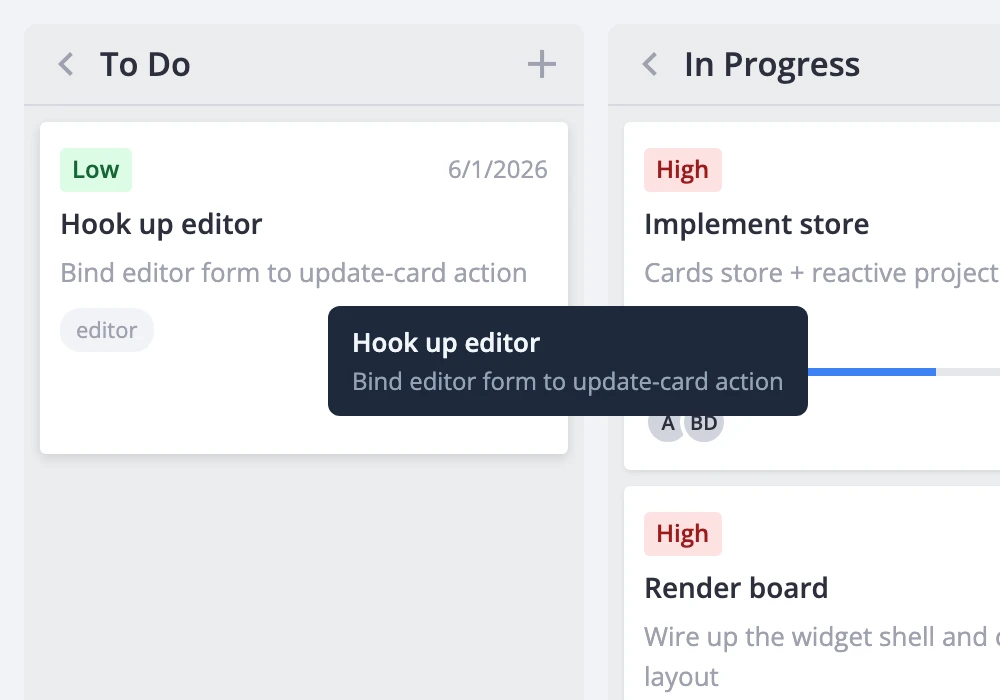
The widget mounts the component inside a fixed-position wrapper offset slightly from the cursor. It doesn't provide any default background, border, or padding - your component owns all of its own styling.
A richer tooltip can pull in helper data. Here's one that resolves priority labels, progress, and assigned users:
<script setup>
  import { computed } from "vue";
  import { getPriorityOptions } from "@svar-ui/vue-kanban";

  const props = defineProps({ card: {} });
  const priorities = getPriorityOptions();

  const priorityLabel = computed(() =>
    props.card.priority != null
      ? priorities.find(p => p.id === props.card.priority)?.label
      : null
  );
</script>

<template>
  <div class="card-tooltip">
    <div class="title">{{ props.card.label }}</div>
    <div v-if="props.card.description" class="desc">{{ props.card.description }}</div>
    <div class="meta">
      <span v-if="priorityLabel" class="chip">{{ priorityLabel }}</span>
      <span v-if="typeof props.card.progress === 'number'" class="chip">{{ Math.round(props.card.progress * 100) }}%</span>
    </div>
  </div>
</template>
Styling and positioning notes
The tooltip wrapper uses position: fixed and pointer-events: none. This means:
- The tooltip follows the cursor but never intercepts clicks or hover events. Clicks pass straight through to the card underneath.
- Don't place interactive elements (buttons, links, inputs) inside the tooltip - they won't receive events. If you need hover-then-interact behavior, use the
cardPopupprop instead, which opens on click and is fully interactive.
The tooltip is suppressed automatically while a card popup is open, so the two never overlap.
The component re-mounts each time the hovered card changes. Keep the tooltip lightweight - avoid expensive computations or large DOM trees that would cause jank as the user moves across cards.