Inactive tasks
The functionality is available in PRO Edition only
An inactive task is a suspended task that does not contribute to calculations, which lets you put work on hold without deleting it. It keeps its dates and dependencies and is rendered in both the grid and the chart with grey styling.
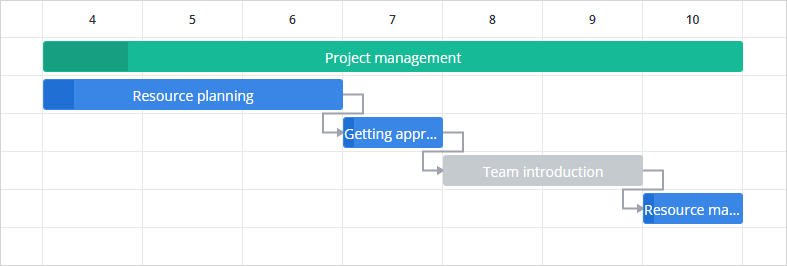
Auto scheduling skips inactive tasks, so the tasks can be dragged anywhere on the chart, and neither their links nor constraints are enforced.
Besides auto scheduling, inactive tasks are excluded from:
- critical path and slack calculations
- resource load calculations. The resource assignments themselves are kept
- the s-curve and the progress line
- the derived values of their parent summary task
Enabling inactive tasks
By default, support for inactive tasks is disabled.
To enable the functionality, set the inactiveTasks property to true:
import { useState } from "react";
import { getData } from "./data";
import { Gantt, Editor } from "@svar/react-gantt";

const data = getData();

export default function App() {
  const [api, setApi] = useState(null);

  return (
    <>
      <Gantt
        ref={setApi}
        tasks={data.tasks}
        links={data.links}
        scales={data.scales}
        inactiveTasks={true}
      />
      {api && <Editor api={api} />}
    </>
  );
}
Loading inactive tasks
To load a task as inactive, add the inactive field to its data object. The field can be applied to a task of any type, but it cannot be set on a segment of a split task.
{
  id: 2,
  text: "API integration",
  start: new Date(2027, 11, 6),
  duration: 4,
  inactive: true
}
Example
The following example demonstrates how to:
- load an inactive task initially
- display inactive tasks in the UI using
inactiveTasks={true} - allow toggling the
inactivefield through the built-in Editor component
import { useState } from "react";
import { Gantt, Editor } from "@svar/react-gantt";
import { getData } from "./data";

const { columns } = getData();

const tasks = [
  {
    id: 1,
    open: true,
    start: new Date(2027, 11, 6),
    duration: 8,
    text: "Mobile app release",
    progress: 60,
    type: "summary"
  },
  //inactive task
  {
    id: 2,
    parent: 1,
    start: new Date(2027, 11, 6),
    duration: 4,
    text: "API integration",
    progress: 80,
    inactive: true
  },
  //inactive task
  {
    id: 3,
    parent: 1,
    start: new Date(2027, 11, 10),
    duration: 4,
    text: "UI Layer",
    progress: 30,
    inactive: true
  }
];

const links = [
  { id: 1, source: 2, target: 3, type: "e2s" }
];

const scales = [
  { unit: "month", step: 1, format: "%F %Y" },
  { unit: "day", step: 1, format: "%D" },
];

export default function App() {
  const [api, setApi] = useState(null);

  return (
    <>
      <Gantt
        ref={setApi}
        tasks={tasks}
        links={links}
        scales={scales}
        columns={columns}
        inactiveTasks={true}
        schedule={{ auto: true }}
      />
      {api && <Editor api={api} />}
    </>
  );
}
Switching the inactive/active flag at runtime
You can change the active/inactive state of a task at any time either via UI or through the API.
via UI
-
In the Editor, use the Inactive checkbox on the Scheduling tab. The checkbox is hidden for split task segments.
-
In the grid, there is no built-in column for the
inactivevalue. To show the flag in the tasks tree, add a column with a custom cell component.
via API
The state change goes through the update-task action:
api.exec("update-task", { id: 1, task: { inactive: true } });
To make the task active again, set the field to false:
api.exec("update-task", { id: 1, task: { inactive: false } });
Any change to the inactive field triggers recalculation of auto scheduling, critical path and slack, resource load, the s-curve, and the progress line. Gantt calculates their positions and values based on the current set of active tasks.
Inactive summary tasks
A summary task is inactive if and only if every one of its child tasks is inactive, and Gantt recalculates the value on every structural change. There are two ways to make a summary task inactive:
- When loading data, Gantt keeps the
inactivevalue you specify for a summary task. If the value is not set, Gantt calculates it from the child tasks. To load a whole branch as inactive, setinactive: trueon every task inside it. - When switching the state of a summary task through the Inactive checkbox or the
update-taskaction, Gantt applies the value to all its descendants, and the summary task follows its child tasks as usual. A single undo reverts the whole branch.
An active summary task takes its dates, its progress (if summary.autoProgress is enabled), and its rollup markers from its active child tasks only. Once it is inactive itself, it takes these values from all of its scheduled child tasks.
Related samples:
Related articles: