Progress line
The functionality is available in PRO Edition only
A progress line gives an at-a-glance read of schedule variance: a single polyline drawn at a status date that bulges left where tasks are behind, bulges right where tasks are ahead, and stays vertical where everything is on track.
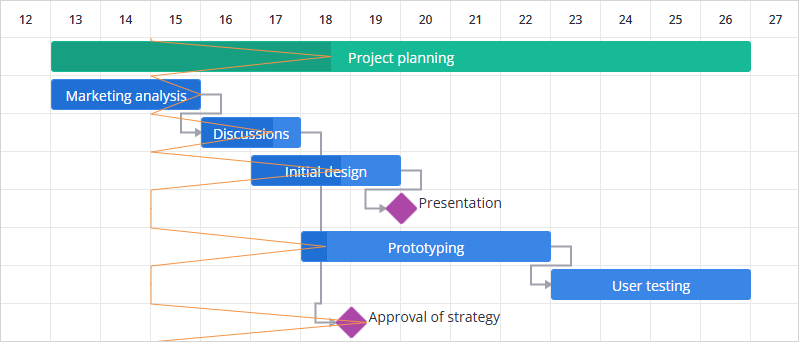
Enable the progress line
Set the progressLine property to true to draw the line with today as the status date:
import { Gantt } from "@svar/react-gantt";
import { getData } from "./data";

const { tasks, links, scales } = getData();

export default function Example() {
  return <Gantt tasks={tasks} links={links} scales={scales} progressLine />;
}
Pass a Date instead of true to anchor the line at a different status date, such as a milestone review date:
<Gantt
  tasks={tasks}
  links={links}
  scales={scales}
  progressLine={new Date(2024, 3, 10)}
/>
How the line is drawn
The line is anchored at the status date and zigzags left or right of it to visualize each task's schedule variance:
- On track — the task point sits exactly on the status date; the line is vertical there
- Behind schedule — the point pulls left of the status date
- Ahead of schedule — the point pulls right of the status date
Every visible row contributes a point, including summary tasks and milestones.
Exceptions
Some tasks don't reflect schedule variance. Depending on the case, a task either contributes no point at all or gets a point that stays on the status date.
Tasks with no point:
- Collapsed children — tasks hidden inside a collapsed summary aren't visible rows
Tasks whose point sticks to the status date:
- Completed tasks — a task that ended before the status date with progress at 100% is already done
- Not-yet-started tasks — a task that starts after the status date with progress at 0% hasn't begun
- Unscheduled tasks — when
unscheduledTasksis enabled, a task without dates has no bar to measure variance from - Inactive tasks — when
inactiveTasksis enabled, an inactive task doesn't take part in the progress tracking - Group rows — rows created by grouping have no task bar
Customize the style of the progress line
To change the default style, redefine the CSS variables for the progress line:
--wx-gantt-progress-line-color— color of the line; default#f5953b--wx-gantt-progress-line-width— width of the line in pixels; default1
import { Gantt } from "@svar/react-gantt";
import { getData } from "./data";
import "./Example.css";

const { tasks, links, scales } = getData();

export default function Example() {
  return <Gantt tasks={tasks} links={links} scales={scales} progressLine />;
}
/* Example.css */
.wx-willow-theme {
  --wx-gantt-progress-line-color: red;
  --wx-gantt-progress-line-width: 2;
}
Related sample:
Related articles:
- progressLine property
- Baselines
- Deadlines