Critical path
The functionality is available in PRO Edition only
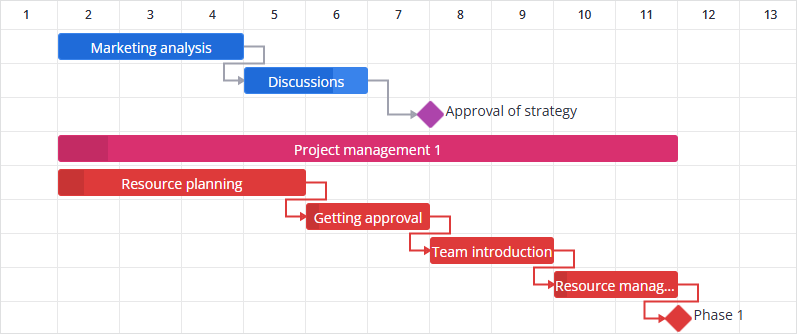
The critical path is the sequence of tasks that defines the minimum project duration. Delaying any task on this path delays the entire project.
Enabling critical path
Use the criticalPath property to enable built-in Critical Path Method (CPM) analysis:
import { Gantt } from "@svar/react-gantt";
import { getData } from "./data";

const { tasks, links, scales } = getData();

function App() {
  return <Gantt tasks={tasks} links={links} scales={scales} criticalPath={{ type: "flexible" }} />;
}
When enabled, critical tasks and links receive a critical boolean property (task.critical and link.critical) set to true for elements that belong to the critical path.
If there are multiple parallel paths with the same duration, the chart highlights the first valid path.
Tasks excluded from the critical path
Inactive tasks do not take part in the calculation. Changing the inactive field of a task triggers a critical path recalculation.
Calculation modes
The criticalPath property accepts an object with the required type field:
criticalPath?: {
  type: "strict" | "flexible";
};
The following Gantt props influence strict critical path calculations:
Example with mode switching:
import { Gantt } from "@svar/react-gantt";
import { getData } from "./data";

const data = getData("critical");

function App() {
  const mode = "flexible";
  const projectStart = new Date(2024, 3, 2);
  const projectEnd = new Date(2024, 3, 12);

  return (
    <Gantt
      tasks={data.tasks}
      links={data.links}
      scales={data.scales}
      criticalPath={{ type: mode }}
      projectStart={projectStart}
      projectEnd={projectEnd}
    />
  );
}
Accessing critical path data
Once critical path is calculated, you can get the corresponding data via the API (api.getState(), api.getTask(), api.serialize()).
// Check if a specific task is on the critical path
const isCritical = api.getTask(id).critical;

// Iterate over all tasks to find critical ones
api.getState().tasks.forEach(task => {
  console.log(task.id, task.critical);
});

// Check critical links
api.getState().links.forEach(link => {
  console.log(link.id, link.critical);
});
Related sample:
Related articles:
- criticalPath property
- projectStart property
- projectEnd property
- Constraints