Filtering
This guide covers how to narrow the calendar to a subset of events without changing the source data: apply a predicate, stack independent filters, or wire a sidebar of group toggles.
How filtering works
Filtering is a view concern. The calendar keeps the full event list in its store and applies one or more predicates when it builds the visible data.
The pieces involved:
state.filters- a map of named slots, each holding one predicate(event) => boolean.filter-events- the action that writes a predicate into a slot or removes it.tag- the slot name. One tag owns one slot. Different tags stack.onfilterevents- an observer prop that fires whenever the action runs.
The rules are simple:
- Writing a new predicate to the same tag replaces the old one.
- Different tags combine with logical AND - an event renders only if every active predicate returns
true. - Untagged calls land in a single shared slot named
_default. - Sending
filter: null(or omitting it) clears the matching tag, or every slot when no tag is given.
Predicates should be pure boolean checks. The store iterates them in insertion order, but the contract is "all must pass," not ordered side effects.
Applying a filter
Dispatch filter-events through the calendar API via api.exec with a predicate function. The init callback gives you a handle to that API:
<script lang="ts">
  import { Calendar } from "@svar-ui/svelte-calendar";

  let api;

  function onlyWork() {
    api.exec("filter-events", {
      filter: e => e.calendarId === "work",
    });
  }

  function clearFilter() {
    api.exec("filter-events", {});
  }
</script>

<button onclick={onlyWork}>Show work only</button>
<button onclick={clearFilter}>Clear</button>

<Calendar {events} {date} init={obj => (api = obj)} />
The predicate receives one event at a time and keeps it when it returns true. Sending {} (or { filter: null }) clears every active slot.
Stacking filters with tags
When two controls produce independent predicates, give each its own tag:
api.exec("filter-events", {
	filter: e => e.calendarId === "work",
	tag: "calendar",
});

api.exec("filter-events", {
	filter: e => (e.text ?? "").toLowerCase().includes("review"),
	tag: "search",
});
Both predicates stay active. The calendar shows events that match calendar AND search. Clearing one tag leaves the other in place:
api.exec("filter-events", { tag: "search" });
Using FilterQuery
FilterQuery from @svar-ui/svelte-filter produces a structured query value that you turn into a predicate via createFilter:
<script lang="ts">
  import { Calendar } from "@svar-ui/svelte-calendar";
  import { FilterQuery, createFilter } from "@svar-ui/svelte-filter";

  let api;

  const fields = [
    { id: "text", label: "Text", type: "text" },
    { id: "start", label: "Start Date", type: "date" },
    { id: "end", label: "End Date", type: "date" },
  ];

  function applyFilter({ value }) {
    api.exec("filter-events", { filter: createFilter(value, {}, fields) });
  }
</script>

<FilterQuery {fields} onchange={applyFilter} placeholder="type a query" />
<Calendar {events} {date} init={obj => (api = obj)} />
createFilter returns a (event) => boolean predicate built from the query value and the field definitions, ready to hand to filter-events.
Using FilterBuilder
FilterBuilder exposes a structured UI for the same filter shape. Wire it the same way - the only change is the component:
<script lang="ts">
  import { Calendar } from "@svar-ui/svelte-calendar";
  import { FilterBuilder, createFilter } from "@svar-ui/svelte-filter";

  let api;

  const fields = [
    { id: "text", label: "Text", type: "text" },
    { id: "start", label: "Start Date", type: "date" },
    { id: "end", label: "End Date", type: "date" },
  ];

  function applyFilter({ value }) {
    api.exec("filter-events", { filter: createFilter(value) });
  }
</script>

<FilterBuilder {fields} type="line" onchange={applyFilter} />
<Calendar {events} {date} init={obj => (api = obj)} />
Any UI that produces a (event) => boolean works the same way. The calendar contract starts and ends at filter-events.
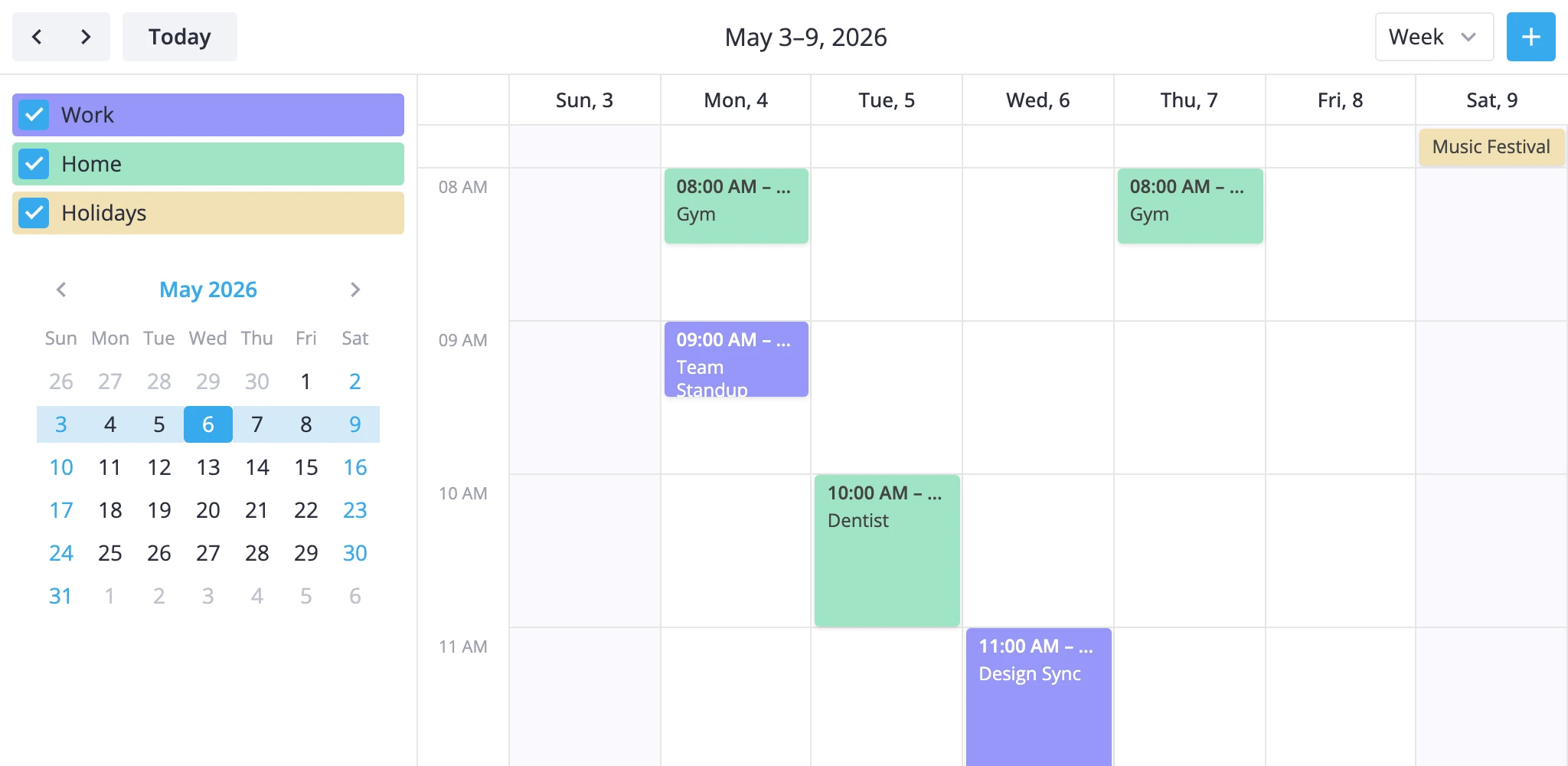
Group toggles via CalendarPanel
CalendarPanel renders calendar-group checkboxes and dispatches filter-events for you under the calendar-panel tag. Tag a accessor field on each event and list the groups:
<script lang="ts">
  import { Calendar, CalendarPanel } from "@svar-ui/svelte-calendar";

  const calendars = [
    { id: "work", label: "Work", css: "cal-work" },
    { id: "home", label: "Home", css: "cal-home" },
    { id: "holiday", label: "Holidays", css: "cal-holiday", active: false },
  ];

  const events = [
    { id: 1, text: "Standup", start, end, calendarId: "work" },
    { id: 2, text: "Gym", start, end, calendarId: "home" },
  ];
</script>

<Calendar {events} {date}>
  <CalendarPanel {calendars} accessor="calendarId" />
</Calendar>
Toggling a checkbox updates the predicate in the calendar-panel slot. When every group is active, the panel sends filter: null instead of a no-op predicate, so the slot stays clean.
The panel uses its own tag, so it stacks with any predicate you push from your own UI.
Observing filter activity
Use onfilterevents to mirror filter state to analytics, the URL, or external badges:
<Calendar
  {events}
  {date}
  onfilterevents={p => console.log("filter changed", p.tag, !!p.filter)}
/>
This callback observes the action - it does not apply the filter. The store has already updated state.filters by the time it fires.