Managing split tasks
The functionality is available in PRO Edition only
Split tasks allow dividing a single task into multiple timeline segments. Segments belong to parent tasks and they are subject to parent task constraints.
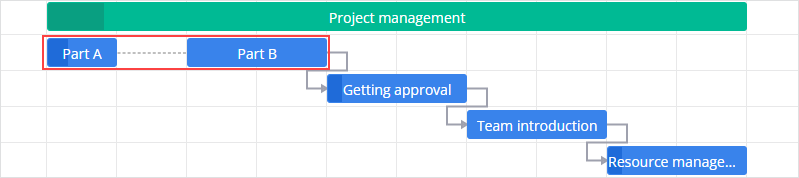
Splitting rules
- Summary tasks and milestones cannot be split
- Only tasks or segments with duration > 1 unit can be split
- If the task has no segments yet, two new segments are created:
- If the original duration is even, the segments have equal durations
- If the original duration is odd, the first segment is longer by 1 unit
- If the task has segments, the specified segment (or last segment if
segmentIndexis not provided) is split into two parts (refer to the previous rule about new segments) - The new segment is inserted immediately after the original
Enabling split tasks
To use split tasks, you must enable the splitTasks property when initializing the Gantt component.
<Gantt
  ref="api"
  :tasks="tasks"
  :splitTasks="true"
/>
Once enabled:
- segments become visible on the timeline
- the Editor displays segment editing controls
- split actions appear in the ContextMenu / Toolbar
- you may use the
split-taskaction
Defining split tasks
A split task is a regular task that contains the segments array.
const tasks = [
  {
    id: 10,
    text: "Design Phase",
    start: new Date(2024, 0, 1),
    duration: 16,
    segments: [
      {
        id: "a",
        start: new Date(2024, 0, 1),
        duration: 6
      },
      {
        id: "b",
        start: new Date(2024, 0, 10),
        duration: 6
      }
    ]
  }
];
Splitting tasks programmatically
SVAR Gantt provides the split-task action for automatically creating new segments. Please, refer to the Splitting rules section above.
Split the whole task:
api.exec("split-task", { id: 5 });
Split a specific segment:
api.exec("split-task", { id: 7, segmentIndex: 1 });
Managing split tasks manually
Segments can be updated through the UI or API. Adjacent or overlapping segments are automatically merged. If only one segment remains, segments is removed and the task becomes a normal task. Also refer to the Splitting rules section above.
Updating a single segment
You can update segments manually by modifying the segments array and executing the update-task action.
api.exec("update-task", {
  id: 20,
  task: { text: "Segment 1" },
  segmentIndex: 0
});
Updating multiple segments
const { segments } = api.getTask(20);
  segments[0].text = "segment 1";
  segments[1].text = "segment 2";

api.exec("update-task", {
  id: 20,
  task: { segments }
});
Adding a new segment
const { segments } = api.getTask(20);

const newSegment = { start: new Date(2024, 0, 20), duration: 5 };

api.exec("update-task", {
  id: 20,
  task: { segments: [...segments, newSegment] }
});
Updating segment dates
When modifying date-related fields (start, end, duration), always provide at least two values so Gantt can recalculate the third consistently.
const { segments } = api.getTask(10);

segments[0] = {
  ...segments[0],
  start: new Date(2024, 0, 5),
  duration: 7,
  end: new Date(new Date(2024, 0, 5).getTime() + 7*24*3600*1000)
};

api.exec("update-task", {
  id: 10,
  task: { segments },
});
Related sample: