Localization
Localization controls every word the calendar shows users - toolbar labels, view names, editor field captions, accessibility strings - plus the date and time format strings used by titles, axis headers, and the agenda. You wire it in by wrapping <Calendar> (and its companions) in the <Locale> component from @svar-ui/vue-core and passing a merged dictionary.
Default Locale
Without a <Locale> wrapper, the calendar falls back to English. The minimal setup needs no locale wiring at all:
<script setup>
  import { Calendar } from "@svar-ui/vue-calendar";
</script>

<template>
  <Calendar :events="events" :date="date" />
</template>
The default English dictionary lives in @svar-ui/calendar-locales as en and pairs with en from @svar-ui/core-locales for shared widgets (segmented controls, date pickers, and friends).
Using an Existing Locale
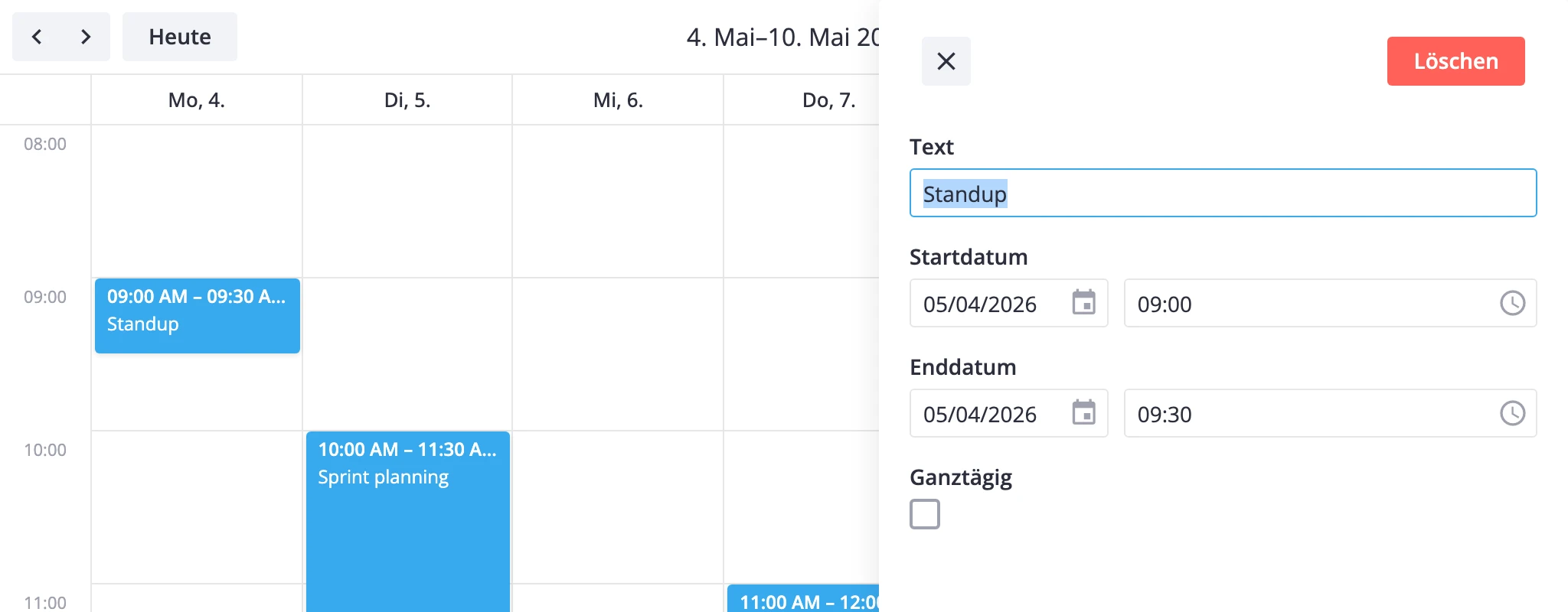
Nine languages ship with the package: en, cn, de, es, fr, it, jp, pt, ru. Pair each calendar locale with the matching core locale so popups, pickers, and the editor speak the same language as the toolbar:
<script setup>
  import { Calendar } from "@svar-ui/vue-calendar";
  import { Locale } from "@svar-ui/vue-core";
  import { de } from "@svar-ui/calendar-locales";
  import { de as deCore } from "@svar-ui/core-locales";

  const words = { ...de, ...deCore };
</script>

<template>
  <Locale :words="words">
    <Calendar :events="events" :date="date" />
  </Locale>
</template>
Spread both dictionaries into one words object and hand it to <Locale>. The calendar pulls its strings from the eventCalendar namespace; the core dictionary covers everything sub-widgets need.
Custom Locale
A custom locale is a partial override. Spread the default first so untouched keys keep their built-in translations, then redefine the handful you actually want to change:
<script setup>
  import { Calendar } from "@svar-ui/vue-calendar";
  import { Locale } from "@svar-ui/vue-core";
  import { en } from "@svar-ui/calendar-locales";
  import { en as enCore } from "@svar-ui/core-locales";

  const words = {
    ...enCore,
    ...en,
    eventCalendar: {
      ...en.eventCalendar,
      Today: "Now",
      "Edit event": "Open event",
      "Delete event": "Remove event",
    },
  };
</script>

<template>
  <Locale :words="words">
    <Calendar :events="events" :date="date" />
  </Locale>
</template>
Drop the inner spread (...en.eventCalendar) and you'll wipe every other label in the namespace. Keep the spread; override only what you need.
Custom Date Formats
Date and time format strings live in the same eventCalendar namespace. Override them the same way to match local conventions:
<script setup>
  import { Calendar } from "@svar-ui/vue-calendar";
  import { Locale } from "@svar-ui/vue-core";
  import { en } from "@svar-ui/calendar-locales";
  import { en as enCore } from "@svar-ui/core-locales";

  const words = {
    ...enCore,
    ...en,
    eventCalendar: {
      ...en.eventCalendar,
      timeScaleFormat: "%H:%i",
      titleDayFormat: "%j %F %Y",
      titleMonthFormat: "%F %Y",
    },
  };
</script>

<template>
  <Locale :words="words">
    <Calendar :events="events" :date="date" />
  </Locale>
</template>
Format tokens use the standard %-style mask shared across SVAR widgets: %Y year, %F month name, %j day of month, %H 24-hour, %i minutes, and so on.
Dynamic Locale Switching
<Locale> is a regular Vue wrapper, so words can come straight from app state. One catch: re-mount the subtree on locale change, otherwise cached date formatters keep emitting strings from the old language.
<script setup>
  import { ref, computed } from "vue";
  import { Calendar } from "@svar-ui/vue-calendar";
  import { Locale, Segmented } from "@svar-ui/vue-core";
  import { en, de, fr } from "@svar-ui/calendar-locales";
  import {
    en as enCore,
    de as deCore,
    fr as frCore,
  } from "@svar-ui/core-locales";

  const dictionaries = {
    en: { ...enCore, ...en },
    de: { ...deCore, ...de },
    fr: { ...frCore, ...fr },
  };

  const locale = ref("en");
  const words = computed(() => dictionaries[locale.value]);

  const options = [
    { id: "en", label: "English" },
    { id: "de", label: "German" },
    { id: "fr", label: "French" },
  ];
</script>

<template>
  <Segmented :options="options" :value="locale" :onchange="v => (locale = v.value)" />

  <Locale :key="locale" :words="words">
    <Calendar :events="events" :date="date" />
  </Locale>
</template>
The :key="locale" binding forces the calendar to rebuild on every language switch. Drop it and the toolbar labels update, but the date formats stay frozen on the language you mounted with.
Locale Object Reference
Calendar locales live under the eventCalendar namespace. The keys break into two groups: UI strings and date format masks.
UI Labels
| Key | Where it appears |
|---|---|
Day, Week, Month, Agenda, Year, Resources, Timeline | View switcher entries in the toolbar |
Today | "Today" button in the toolbar |
Edit event, Delete event, Delete | Context-menu items and editor buttons |
Text, Start date, End date, All day, Full day | Default editor field labels |
Calendars, Menu, Calendar, Calendar sidebar | CalendarPanel heading and ARIA labels |
Previous period, Next period, Date navigation, Calendar controls, Calendar filters | ARIA labels on toolbar and panel controls |
Date and Time Formats
These format strings drive every date the calendar prints. Each value is a %-style mask.
| Key | Used in |
|---|---|
timeScaleFormat | Time-axis labels in day, week, resources, timeline views |
weekScaleFormat | Day-column headers in the week view |
monthScaleFormat | Day-of-week headers in the month view |
weekNumberFormat | Optional week-number column |
titleDayFormat | Toolbar date label in day view |
titleWeekFormatStart, titleWeekFormatEnd | Toolbar range label in week view |
titleMonthFormat | Toolbar date label in month and agenda views |
yearMonthFormat | Mini-month captions in year view |
agendaDayFormat | Day grouping headers in agenda view |