Localization
The Kanban widget ships with English labels by default -- editor field names, priority options, toolbar and context-menu text, and ARIA labels. To display the widget in another language, wrap it in a Locale component and pass a merged dictionary that covers both the kanban-specific keys and the shared core keys (calendar names, button labels, date formats).
Column labels, card titles, and other user-supplied data aren't part of the locale system. You translate those yourself, the same way you'd handle any app-level strings.
Default Locale
Without any locale setup, the widget uses built-in English labels. This is a valid configuration -- no extra imports needed.
<script>
  import { Kanban } from "@svar-ui/svelte-kanban";
</script>

<Kanban {cards} {columns} />
Using an Existing Locale
The package provides ready-made translations for Chinese, German, Spanish, French, Italian, Japanese, Portuguese, and Russian. Import the kanban locale from @svar-ui/kanban-locales and the core locale from @svar-ui/core-locales, merge them, and pass the result to Locale.
<script>
  import { Locale } from "@svar-ui/svelte-core";
  import { Kanban } from "@svar-ui/svelte-kanban";
  import { de } from "@svar-ui/kanban-locales";
  import { de as deCore } from "@svar-ui/core-locales";

  const words = { ...de, ...deCore };
</script>

<Locale {words}>
  <Kanban {cards} {columns} />
</Locale>
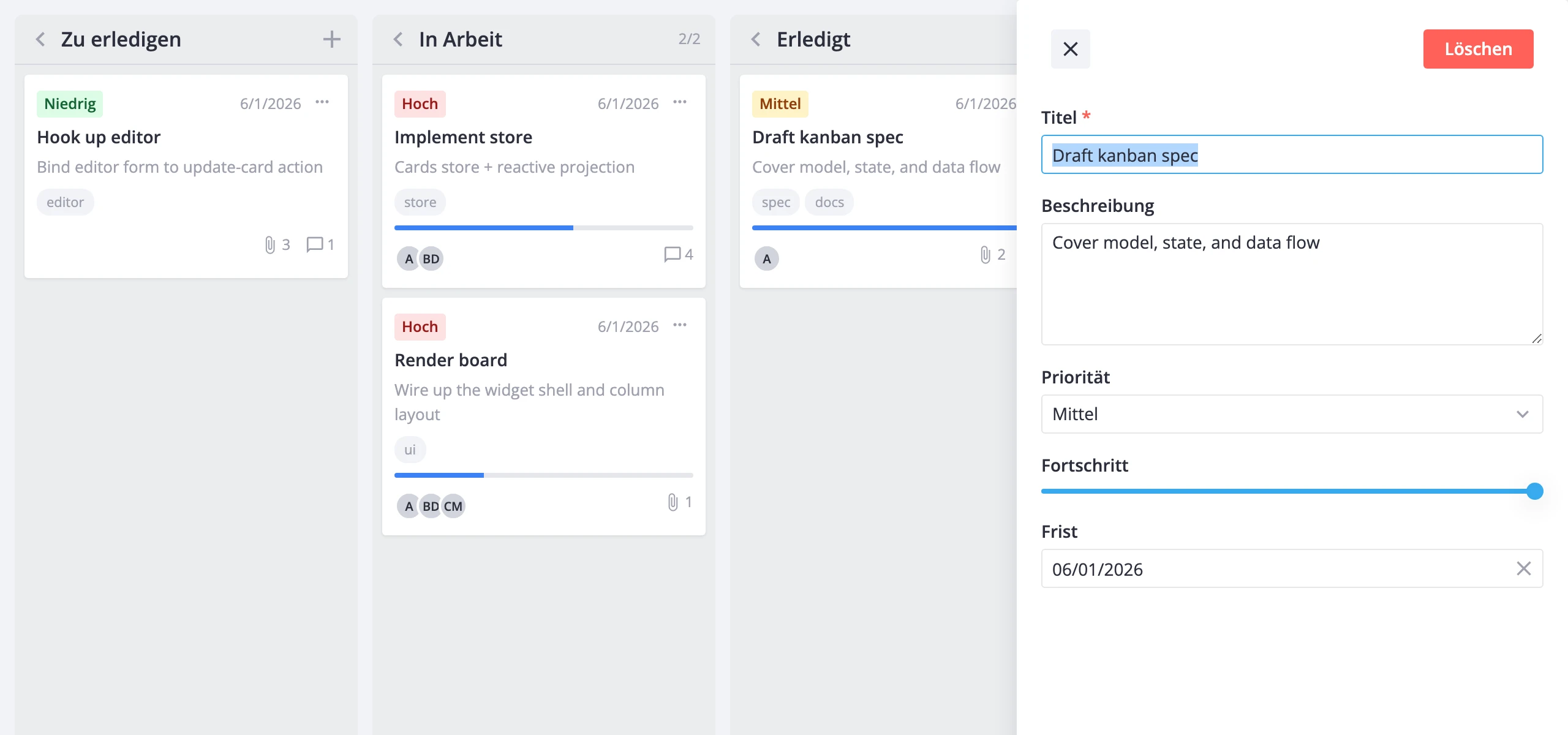
Both dictionaries are required. The kanban locale covers editor labels, menu items, toolbar text, and priority names. The core locale covers shared UI strings -- calendar month/day names, date formats, and common button labels like "OK" and "Cancel".
Custom Locale
To override a few labels without replacing the entire dictionary, spread the default locale and replace only the keys you need.
<script>
  import { Locale } from "@svar-ui/svelte-core";
  import { Kanban } from "@svar-ui/svelte-kanban";
  import { en } from "@svar-ui/kanban-locales";
  import { en as enCore } from "@svar-ui/core-locales";

  const words = {
    ...en,
    ...enCore,
    kanban: {
      ...en.kanban,
      Priority: "Urgency",
      Low: "Minor",
      Medium: "Normal",
      High: "Critical",
    },
  };
</script>

<Locale {words}>
  <Kanban {cards} {columns} />
</Locale>
Always spread the base locale first so you don't lose unset keys.
Switching Language at Runtime
Make the words object reactive and re-key the Locale wrapper when the language changes. The {#key} block forces the widget to re-mount with the new strings.
<script>
  import { Locale } from "@svar-ui/svelte-core";
  import { Kanban } from "@svar-ui/svelte-kanban";
  import { en, de, fr } from "@svar-ui/kanban-locales";
  import { en as enCore, de as deCore, fr as frCore } from "@svar-ui/core-locales";

  const dictionaries = {
    en: { ...en, ...enCore },
    de: { ...de, ...deCore },
    fr: { ...fr, ...frCore },
  };

  let locale = $state("en");
  let words = $derived(dictionaries[locale]);
</script>

<select bind:value={locale}>
  <option value="en">English</option>
  <option value="de">German</option>
  <option value="fr">French</option>
</select>

{#key locale}
  <Locale {words}>
    <Kanban {cards} {columns} />
  </Locale>
{/key}
Locale Object Reference
The kanban locale (@svar-ui/kanban-locales) contains a single kanban key with flat string entries:
| Group | Keys | Used in |
|---|---|---|
| Editor field labels | Title, Description, Priority, Progress, Deadline, Tags, Users | Editor sidebar/modal |
| Priority options | Low, Medium, High | Priority picker, card badge |
| Editor actions | Delete | Editor top bar |
| Toolbar | Sort, Title A-Z, Title Z-A, Priority Low-High, Priority High-Low, Clear sorting | Toolbar sort menu |
| Context menu | Edit card, Duplicate card, Delete card | Right-click menu |
| ARIA labels | Kanban board, Expand column, Collapse column, Add card to, Card menu, Attachments, Comments, Card | Screen readers |
The core locale (@svar-ui/core-locales) adds calendar (month and day names), formats (date/time format strings like %m/%d/%Y), and core (shared button labels like OK, Cancel, Select).