Customization
Apart from the built-in task types and default bar styles, Gantt lets you add your own task types, style them with CSS, and render custom content inside task bars with a template.
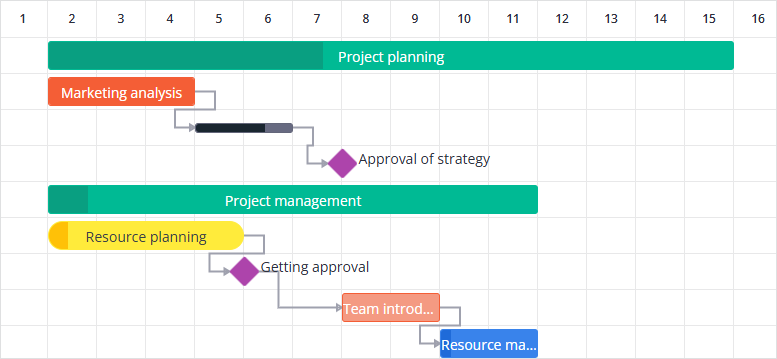
Adding custom task types
In addition to the built-in task types, you can add custom task types. Custom task types are defined via taskTypes and then used in the tasks array.
The taskTypes array replaces the built-in types. To keep them, add the defaultTaskTypes array (task, summary, and milestone) to the list along with your custom types:
import { defaultTaskTypes } from "@svar-ui/svelte-gantt";

const taskTypes = [...defaultTaskTypes, { id: "urgent", label: "Urgent" }];
const tasks = [
  {
    id: 5,
    text: "Critical fix",
    start: new Date(2024, 3, 18),
    end: new Date(2024, 3, 19),
    type: "urgent",
  },
]
Styling
You can customize the look of a task type by adding CSS rules for each task type using its id.
<script>
  import { Gantt, defaultTaskTypes } from "@svar-ui/svelte-gantt";

  const tasks = [
    {
      id: 1,
      text: "Urgent task",
      start: new Date(2024, 3, 10),
      end: new Date(2024, 3, 13),
      progress: 40,
      type: "urgent",
    },
  ];

  const taskTypes = [...defaultTaskTypes, { id: "urgent", label: "Urgent" }];
</script>

<Gantt {tasks} {taskTypes} />

<style>
  :global(.wx-gantt .wx-bar.wx-task.urgent) {
    background-color: #f49a82;
    border: 1px solid #f45e36;
  }

  :global(.wx-gantt .wx-bar.wx-task.urgent .wx-progress-percent) {
    background-color: #f45e36;
  }
</style>
Custom task types behave like standard tasks unless additional behavior is implemented via API interception.
Related sample:
Applying template to task bars
You can define your own template for task bars using the taskTemplate property.
Below is an example of the component that uses the onaction callback to send the custom-click action to Gantt.
<script>
  let { data, onaction } = $props();

  function doClick(ev) {
    ev.stopPropagation();
    onaction({
      action: "custom-click",
      data: {
        clicked: !data.clicked,
        id: data.id,
      },
    });
  }
</script>

{#if data.type !== "milestone"}
  <div class="wx-text-out text-right">{data.text || ""}</div>
  <button onclick={doClick}>
    {#if data.clicked}Was clicked{:else}Click Me{/if}
  </button>
{:else}
  <div class="wx-text-out text-left">{data.text || ""}</div>
{/if}

<style>
  button {
    font-size: 10px;
    position: relative;
    z-index: 2;
    font: var(--wx-gantt-bar-font);
  }

  .text-right {
    left: 100%;
    top: -2px;
  }

  .text-left {
    right: 100%;
    top: -2px;
  }

  .text-right,
  .text-left,
  button {
    padding: 0 2px;
    font-size: 12px;
  }
</style>
In the next example we import the component above and listen to the custom-click action to trigger the update-task action on click.
<script>
  import { getData } from "../data";
  import { Gantt } from "@svar-ui/svelte-gantt";
  import MyTaskContent from "../custom/MyTaskContent.svelte";

  const data = getData();
  let api = $state();

  function doClick(ev) {
    api.exec("update-task", {
      id: ev.id,
      task: {
        clicked: ev.clicked,
      },
    });
  }
</script>

<Gantt
  bind:this={api}
  oncustomclick={doClick}
  taskTemplate={MyTaskContent}
  tasks={data.tasks}
  links={data.links}
  scales={data.scales}
/>