Resizer
You can expand or collapse the grid and chart areas manually using the resizing handle between them.
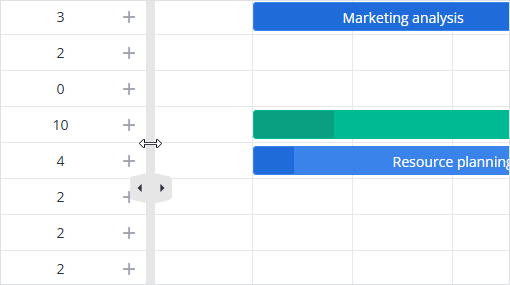
Setting the initial grid width
Use the gridWidth property to set the initial width of the grid area in pixels (default: 440):
<Gantt tasks={data.tasks} scales={data.scales} gridWidth={300} />
Setting the initial Subgrid width
The functionality is available in PRO Edition only
If there are columns with section: "subGrid", Gantt shows the Subgrid to the right of the chart and adds a second resizing handle between the chart and the Subgrid. The user drags it in the same way as the handle of the left grid.
Use the subGridWidth property to set the initial width of the Subgrid:
<Gantt tasks={data.tasks} scales={data.scales} {columns} subGridWidth={220} />
Setting the grid width programmatically
Use the resize-grid action via api.exec() to change the grid width from code:
<script>
  import { Gantt } from "@svar-ui/svelte-gantt";
  import { getData } from "./data";

  const data = getData();

  function init(api) {
    api.exec("resize-grid", { width: 300 });
  }
</script>

<Gantt {init} tasks={data.tasks} scales={data.scales} />
To change the width of the Subgrid, add the section parameter:
api.exec("resize-grid", { width: 220, section: "subGrid" });
Listening to resize events
To react when the user drags the resizer handle, listen to the resize-grid action:
<script>
  import { Gantt } from "@svar-ui/svelte-gantt";
  import { getData } from "./data";

  const data = getData();

  function init(api) {
    api.on("resize-grid", ({ width }) => {
      console.log("Grid width changed to:", width);
    });
  }
</script>

<Gantt {init} tasks={data.tasks} scales={data.scales} />
To find out whether the user dragged the resizer of the left grid or of the Subgrid | PRO feature, check the section parameter:
api.on("resize-grid", ({ width, section }) => {
  if (section === "subGrid") console.log("Subgrid width changed to:", width);
  else console.log("Grid width changed to:", width);
});
To react to chart container size changes, listen to the resize-chart action:
<script>
  import { Gantt } from "@svar-ui/svelte-gantt";
  import { getData } from "./data";

  const data = getData();

  function init(api) {
    api.on("resize-chart", ({ width, height }) => {
      console.log("Chart resized:", width, height);
    });
  }
</script>

<Gantt {init} tasks={data.tasks} links={data.links} scales={data.scales} />
Related articles: