Header menu
The section describes how to add a header menu to columns in the grid area.
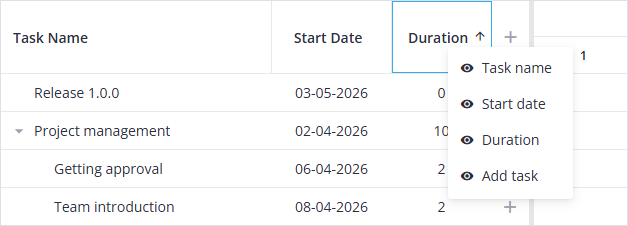
It will allow you to dynamically hide and show them via the HeaderMenu. To add a header menu, you should import HeaderMenu from "@svar-ui/react-gantt" and then place the Gantt tag inside the HeaderMenu tag.
import { Gantt, HeaderMenu } from "@svar-ui/react-gantt";

<HeaderMenu api={api} ...>
  <Gantt ref={setApi} ... />
</HeaderMenu>
The description of HeaderMenu properties you can see here.
The example below shows how to add a header menu to the grid columns and make possible to hide the "start" and "duration" columns:
import { useState } from "react";
import { getData } from "../data";
import { Gantt, HeaderMenu } from "@svar-ui/react-gantt";

const data = getData();
const columns = { start: true, duration: true };

function App() {
  const [api, setApi] = useState(null);

  return (
    <HeaderMenu api={api} columns={columns}>
      <Gantt
        ref={setApi}
        tasks={data.tasks}
        links={data.links}
        scales={data.scales}
      />
    </HeaderMenu>
  );
}
Related sample:
Related article: HeaderMenu helper