Add tasks via placeholder row
The functionality is available in PRO Edition only
The placeholder row is an empty row shown below the real tasks in the grid.
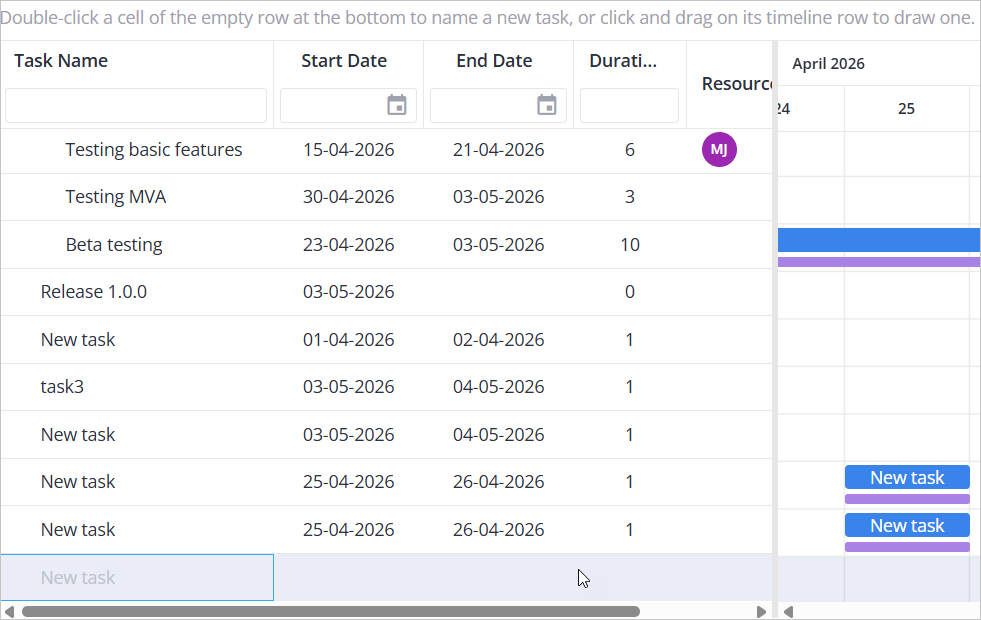
It lets users create a new task without opening the Editor, in one of two ways: by filling in an editable cell on the row in the grid, or by clicking and dragging on the placeholder row within the chart area.
Enabling the placeholder row
To enable the placeholder row, you need to set the placeholderRow property to true:
<Gantt
  ref={setApi}
  tasks={tasks}
  links={links}
  scales={scales}
  placeholderRow
/>
The row is hidden automatically when readonly is enabled.
Enabling the ability to add tasks
To provide the ability to create a task from a placeholder row:
- Through the chart: no extra configuration is needed beyond
placeholderRow. It already lets your users draw a new task by clicking and dragging on the placeholder row's empty timeline:
<Gantt placeholderRow />
A user should press the mouse button down directly on the timeline area of the placeholder row (at the cell where the task should start), then drag across to the desired end cell, then release.
- Through the grid: with
placeholderRowenabled, define inline editors for at least one column to let your users create a task by filling in a grid cell. Only columns with an editor of their own are editable on the placeholder row:
const columns = [
  { id: "text", header: "Task name", width: 220, editor: "text" },
  { id: "start", header: "Start date", width: 120, editor: "datepicker" },
];
The task is created once the user commits an edited field. A column without editor (such as the built-in "add-task" button column) is simply skipped on the placeholder row.
Example
import { useState } from "react";
import { Gantt, Editor } from "@svar/react-gantt";
import { getData } from "./data";

const { tasks, links, scales, resources, assignments } = getData();

const columns = [
  { id: "text", header: "Task name", width: 220, sort: true, editor: "text" },
  { id: "start", header: "Start date", width: 120, align: "center", sort: true, editor: "datepicker" },
  { id: "end", header: "End date", width: 120, align: "center", sort: true, editor: "datepicker" },
  { id: "duration", header: "Duration", width: 90, align: "center", sort: true, editor: "text" },
  { id: "resources", header: "Resources", width: 140, editor: "multiselect" },
  { id: "add-task", header: "", width: 37, align: "center" },
];

export default function Example() {
  const [api, setApi] = useState(null);

  return (
    <>
      <Gantt
        ref={setApi}
        tasks={tasks}
        links={links}
        scales={scales}
        resources={resources}
        assignments={assignments}
        placeholderRow
        columns={columns}
      />
      {api && <Editor api={api} />}
    </>
  );
}
Related sample:
Related articles: