Adding backend to SVAR React Gantt with Next.js
This tutorial continues from where Part 1 left off. We have a working Gantt chart with client-side data and editing. Now let's add a backend to persist changes.
The complete source code is available at github.com/svar-widgets/react-gantt-nextjs, this tutorial covers the backend branch.
Why a backend?
Our current Gantt works great, but changes disappear on page refresh. For a real application we need:
- Persistent storage for tasks and links
- Multi-user access to the same project data
- Server-side validation and business logic
We'll use SQLite for simplicity — it's file-based, requires no separate server, and works well for demos and small teams.
Setting up the database
First, let's add the SQLite package:
npm install better-sqlite3
npm install -D @types/better-sqlite3
The database module lives at src/lib/db.ts. The schema has two tables:
CREATE TABLE tasks (
  id INTEGER PRIMARY KEY AUTOINCREMENT,
  text TEXT DEFAULT '',
  start TEXT,
  end TEXT,
  duration INTEGER,
  progress INTEGER DEFAULT 0,
  type TEXT,
  parent INTEGER DEFAULT 0,
  orderId INTEGER DEFAULT 0
);

CREATE TABLE links (
  id INTEGER PRIMARY KEY AUTOINCREMENT,
  source INTEGER NOT NULL,
  target INTEGER NOT NULL,
  type TEXT NOT NULL
);
A few notes on the schema:
startandendare stored as TEXT (ISO date strings)parentreferences another taskidfor hierarchical structures (0 = top level)orderIdmaintains display order within each branch — siblings are sorted by this valuetypeon tasks can be "summary", "milestone", or null for regular taskstypeon links defines the dependency: "e2s" (end-to-start), "s2s", "e2e", "s2e"
The database initializes on first access. If tables are empty, it seeds them with sample data so there's something to display.
Loading data
Server side
The server needs to expose tasks and links through REST endpoints. Here's what the tasks route looks like at src/app/api/tasks/route.ts:
import { NextResponse } from "next/server";
import { getAllTasks, createTask } from "@/lib/db";

export async function GET() {
  const tasks = getAllTasks();
  return NextResponse.json(tasks);
}
The links route follows the same pattern. One thing worth noting: dates are stored as ISO strings in the database. We'll handle conversion on the client.
Client side
To connect Gantt to our backend, we'll use the data provider package:
npm install @svar-ui/gantt-data-provider
The component changes are minimal. Instead of hardcoded arrays, we initialize a RestDataProvider and call its getData() method:
const server = useMemo(() => new RestDataProvider("/api"), []);

useEffect(() => {
  server.getData().then((data) => {
    setTasks(data.tasks);
    setLinks(data.links);
  });
}, [server]);
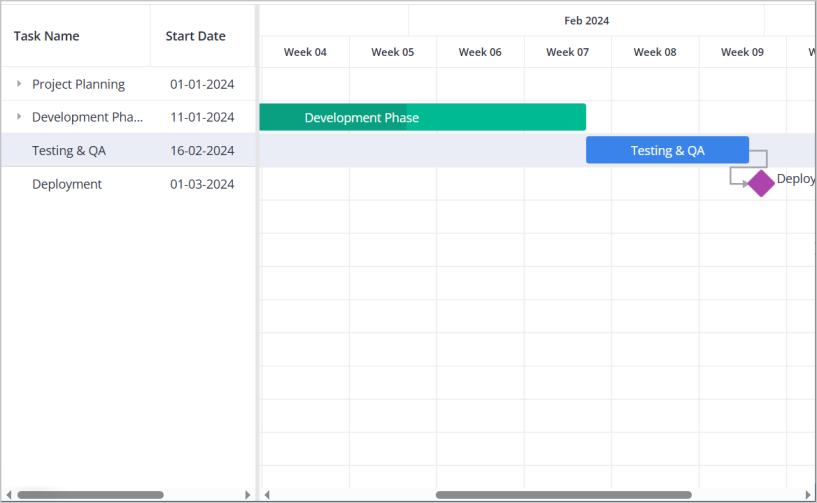
What's RestDataProvider actually doing? It's a thin wrapper around fetch with two jobs:
- Fetches
/api/tasksand/api/linksin parallel - Converts date strings from JSON into JavaScript
Dateobjects
That's it for loading. The provider knows the REST conventions and handles parsing, so the component receives ready-to-use data.
Saving data
To persist changes, we need a full set of REST endpoints:
| Method | Endpoint | Purpose |
|---|---|---|
| GET | /tasks | Get all tasks |
| POST | /tasks | Create task |
| PUT | /tasks/{id} | Update task |
| DELETE | /tasks/{id} | Delete task |
| GET | /links | Get all links |
| POST | /links | Create link |
| PUT | /links/{id} | Update link |
| DELETE | /links/{id} | Delete link |
For POST and PUT, the response should include the ID:
{
  "id": 123
}
For DELETE, return an empty object: {}.
See the REST routes documentation for detailed request/response formats.
Connecting the component
With endpoints ready, we connect the data provider to the Gantt through its init callback:
const init = useCallback((api) => {
  api.setNext(server);
}, [server]);
The setNext call plugs the provider into the component's action pipeline. From this point, when something happens in the Gantt — a task is created, updated, deleted, or moved — the action flows through the provider to the appropriate REST endpoint.
How does this work internally? The Gantt emits actions for every data operation: add-task, update-task, delete-task, and so on. The RestDataProvider intercepts these, maps them to HTTP methods, ensures only valid data is sent, and handles the server response (including updating local IDs after creation).
No need to wire up event handlers or manage optimistic updates — the provider handles the mapping between component actions and REST calls. If the default REST scheme doesn't fit your backend, the provider's API allows customizing routes, adding headers, or defining your own transport entirely — but that's beyond this tutorial.
Row reordering
Users can drag tasks to reorder them within the grid. The client side already handles this — the RestDataProvider sends move operations automatically. But the server needs special handling to track display order.
When a task is moved, the request includes extra fields:
{
  "operation": "move",
  "mode": "after",
  "target": 4
}
This means "place this task after task #4". The mode can be "after", "before", or "child" (to nest under another task).
To handle this on the server, we added logic in the PUT endpoint that checks for the operation field. When it's a move operation, instead of updating task properties, we recalculate the task's parent and orderId based on where it's being placed. Siblings get their orderId values shifted to make room.
Similarly, POST requests for new tasks can include mode and target to specify where in the hierarchy the task should appear.
Adding the toolbar
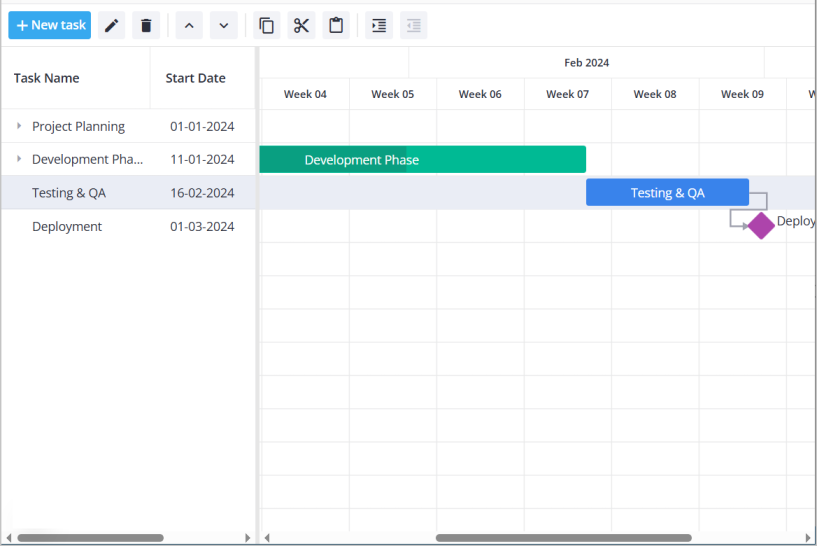
To better test the reordering we just implemented — along with other operations like adding tasks, deleting and indenting — let's add the Toolbar component. It's included in the gantt package, no extra install needed.
The toolbar needs the Gantt's API reference to trigger actions. We capture it during initialization and pass it to both the Toolbar and Editor:
<Willow>
  <Toolbar api={api} />
  <Gantt tasks={tasks} links={links} init={init} />
  {api && <Editor api={api} />}
</Willow>
Clicking "New Task" in the toolbar creates a task through the same action pipeline — which flows through the data provider to the REST endpoint. Everything stays in sync.
Handling errors
What happens when something goes wrong? There are several layers where errors can be caught.
Loading errors
getData() returns a promise, so handling fetch failures is straightforward:
server.getData()
  .then((data) => {
    setTasks(data.tasks);
    setLinks(data.links);
  })
  .catch((error) => {
    // Show error UI, retry option, etc.
    console.error("Failed to load data:", error);
  });
Save operation errors
When a save operation fails, the action bubbles through the component's event system with error information. You can listen for specific actions and react accordingly — for instance, removing a row that failed to save.
However, this approach has limits. The server shouldn't act as a validation layer. Validation belongs on the client side, where you can prevent invalid operations before they're attempted. Server errors should be rare exceptions, not part of the normal flow.
For most applications, the pragmatic solution is: inform the user something went wrong, and on their consent, reload the Gantt with fresh data from the server. This ensures the UI stays in sync with the actual database state.
Custom error handling with RestDataProvider
For centralized error handling, you can subclass RestDataProvider and override the send method:
class MyDataProvider extends RestDataProvider {
  async send<T>(
    url: string,
    method: string,
    data?: any,
    customHeaders: any = {}
  ): Promise<T> {
    try {
      return await super.send(url, method, data, customHeaders);
    } catch (error) {
      // Show toast notification, log to monitoring service, etc.
      showErrorNotification("Failed to save changes");
      throw error;
    }
  }
}
This intercepts all REST operations in one place — the simplest way to detect failures and surface them in your UI.
Progress and sync State
Related to error handling is tracking operation progress. While showing a loading spinner for initial data fetch is usually unnecessary (data loads fast, spinner causes flickering), you might want to indicate when changes are being saved.
Loading progress
If you do need a loading indicator, wrap the getData() promise:
const [loading, setLoading] = useState(true); // your custom state

useEffect(() => {
  server.getData()
    .then((data) => {
      setTasks(data.tasks);
      setLinks(data.links);
    })
    .finally(() => setLoading(false));
}, [server]);
Tracking all server operations
To show progress for save operations as well, override send in a custom provider. The onProgress callback is your own function — pass it when creating the provider:
class MyDataProvider extends RestDataProvider {
  constructor(url: string, private onProgress: (active: boolean) => void) {
    super(url);
  }

  async send<T>(url: string, method: string, data?: any, headers: any = {}): Promise<T> {
    this.onProgress(true);
    try {
      return await super.send(url, method, data, headers);
    } finally {
      this.onProgress(false);
    }
  }
}

// Usage:
const server = new MyDataProvider("/api", (active) => setSaving(active));
This fires on every REST call — initial load and all subsequent saves.
Complete component code
Here's the full GanttChart.tsx with all pieces in place:
"use client";

import { useState, useEffect, useCallback, useMemo } from "react";
import type { ITask, ILink, IApi } from "@svar-ui/react-gantt";
import { Gantt, Toolbar, Willow, Editor } from "@svar-ui/react-gantt";
import { RestDataProvider } from "@svar-ui/gantt-data-provider";
import "@svar-ui/react-gantt/all.css";

const apiUrl = "/api";

const scales = [
  { unit: "month", step: 1, format: "%M %Y" },
  { unit: "week", step: 1, format: "Week %w" },
];

export default function GanttChart() {
  const [mounted, setMounted] = useState(false);
  const [tasks, setTasks] = useState<ITask[]>([]);
  const [links, setLinks] = useState<ILink[]>([]);
  const [api, setApi] = useState<IApi | undefined>();

  const server = useMemo(() => new RestDataProvider(apiUrl), []);

  useEffect(() => {
    setMounted(true);
    server.getData().then((data) => {
      setTasks(data.tasks);
      setLinks(data.links);
    });
  }, [server]);

  const init = useCallback((ganttApi: IApi) => {
    setApi(ganttApi);
    ganttApi.setNext(server);
  }, [server]);

  if (!mounted) {
    return <div style={{ height: "100%", width: "100%" }} />;
  }

  return (
    <div style={{ height: "100%", width: "100%" }}>
      <Willow>
        <Toolbar api={api} />
        <Gantt tasks={tasks} links={links} scales={scales} init={init} />
        {api && <Editor api={api} />}
      </Willow>
    </div>
  );
}
Summary
We now have a Gantt that syncs all changes to the server:
- Loading:
RestDataProvider.getData()fetches and parses data - Saving: Actions flow through
api.setNext(server)to REST endpoints - Reordering: Special
operation: "move"requests update task positions - UI: Toolbar provides common operations, Editor allows detailed editing
The component handles the complexity of mapping UI interactions to API calls. Your job is implementing the REST endpoints with whatever database and business logic your application needs.