AI Development with SVAR
Build applications with SVAR UI components using AI coding assistants such as Claude Code, Cursor, Codex CLI, Antigravity CLI, GitHub Copilot, and ChatGPT.


In the modern development landscape, AI automation tools have become essential for efficient coding and
problem-solving. SVAR provides three ways to help AI agents generate accurate code:

MCP Server
Direct access to the latest SVAR documentation and examples

Skills
Agent-native instructions for supported coding tools

Context Packs
Markdown files containing condensed SVAR documentation
MCP Server
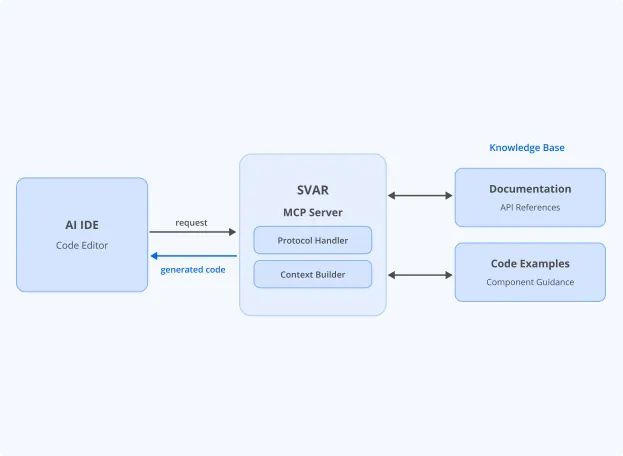
We offer a Model Context Protocol (MCP) server, which gives AI assistants access to the latest SVAR documentation,
API references, and code examples. This helps AI tools generate more accurate code and reduces the risk of hallucinations.
Server URL
Why use the SVAR MCP Server?
SVAR MCP server makes generated code more accurate and reduces the risk of using outdated APIs. It provides:
- Access to the latest documentation
- Current API references
- Up-to-date code examples
- Component-specific implementation guidance
- Retrieval-based answers generated from official SVAR resources
For installation instructions and supported integrations, see the MCP Server documentation
Supported tools: Claude Code, Cursor, OpenAI Codex CLI, Antigravity CLI, GitHub Copilot, ChatGPT or any other MCP-compatible AI environment.
Skills
SVAR skills work with AI coding agents that support the SKILL.md convention, including Claude Code,
Cursor, Codex CLI, and Antigravity CLI. Run the following command to install the skill into your project,
or visit the skill repository and copy files from there.

React
npx skills add svar-widgets/skills --skill svar-react
Svelte
npx skills add svar-widgets/skills --skill svar-svelte
Vue
npx skills add svar-widgets/skills --skill svar-vueSkills are loaded automatically when the AI agent decides they match the task. To explicitly activate a skill:
In Claude Code
start your prompt with /svar-svelte
In Codex CLI
start your prompt with $svar-svelte
Supported tools: Claude Code, Cursor, OpenAI Codex CLI, Antigravity CLI
Context Packs
Context Packs are markdown files with the essential information needed to work with specific SVAR components. They are portable documentation bundles for AI tools that do not support Skills or MCP integrations. Find context packs in the guides folder and attach them to prompts, upload to AI assistants, or use in custom workflows. They work with ChatGPT, GitHub Copilot, browser-based AI tools, and custom LLM apps.
Examples
svar-svelte-grid.md context for the Svelte grid package
svar-svelte-all.md context for all packages in one file
Choose the package that best matches your use case. Smaller files provide more focused context and lower token usage, while the "all components" packages provide complete library coverage.
| React | |
|---|---|
| all components | 279kb; ~77k tokens |
| comments | 20kb; ~5.6k tokens |
| core | 107kb; ~30k tokens |
| editor | 28kb; ~7.6k tokens |
| file manager | 33kb; ~9k tokens |
| filter | 49kb; ~13k tokens |
| gantt | 38kb; ~10k tokens |
| grid | 37kb; ~10k tokens |
| layout | 19kb; ~5.3k tokens |
| menu | 21kb; ~5.9k tokens |
| tasklist | 16kb; ~4.4k tokens |
| toolbar | 21kb; ~5.8k tokens |
| Svelte | |
|---|---|
| all components | 263kb; ~73k tokens |
| comments | 19kb; ~5.4k tokens |
| core | 101kb; ~28k tokens |
| editor | 26kb; ~7.3k tokens |
| file manager | 32kb; ~8.7k tokens |
| filter | 47kb; ~13k tokens |
| gantt | 36kb; ~9.9k tokens |
| grid | 35kb; ~9.8k tokens |
| layout | 18kb; ~5k tokens |
| menu | 20kb; ~5.6k tokens |
| tasklist | 15kb; ~4.2k tokens |
| toolbar | 20kb; ~5.6k tokens |
| Vue | |
|---|---|
| all components | 275kb; ~76k tokens |
| comments | 20kb; ~5.6k tokens |
| core | 105kb; ~29k tokens |
| editor | 27kb; ~7.5k tokens |
| file manager | 32kb; ~8.9k tokens |
| filter | 49kb; ~13k tokens |
| gantt | 37kb; ~10k tokens |
| grid | 37kb; ~10k tokens |
| layout | 19kb; ~5.2k tokens |
| menu | 21kb; ~5.8k tokens |
| tasklist | 16kb; ~4.3k tokens |
| toolbar | 21kb; ~5.8k tokens |
Choosing the Right Integration
SVAR supports multiple ways of integrating with AI coding assistants. Depending on the capabilities of your development environment, you can use native integrations (Skills and MCP) or fallback to portable context packs.
| AI Tool | Skills | MCP | Context Packs |
|---|---|---|---|
| Cursor | |||
| Claude Code | |||
| Codex CLI | |||
| Antigravity CLI | |||
| GitHub Copilot | Partial | ||
| ChatGPT | Partial | ||
| One-off prompts |